

There are several methods to deploy infrastructure into AWS, some common techniques include:
- AWS Console
- AWS Command Line Interface (CLI)
- Infrastructure as Code (IaC) – Cloudformation and Terraform
I prefer to use ‘Infrastructure as Code’ (via Terraform) over the other methods mentioned above. One advantage of ‘Infrastructure as Code’, is that you can security check (known as ‘linting’) your code before deploying it into your AWS account. Checkov.io provides some great free tools to security check your Infrastructure as Code (IaC) and guide you to make security improvements to your code. The environment I work in has adopted some new DevSecOps practices where our AWS terraform Infrastructure code is security scanned by Checkov (https://checkov.io) before pull requests are implemented into production via the main branch. I should also mention that Checkov has many integrations including CD/CI pipeline providers such as Bitbucket and GitLab.
In this post I will test our default vpc setup that incorporates the following features:
- VPC that span across 3 availability zones (AZs)
- VPC flow logs enabled
- DNS resolution for VPC
- SSM role for remote access to EC2 instances
- Tag resources
- No internet access (unless specifically required by the application)
To achieve the remote access capabilities we will utilise VPC endpoints and wrap a security group around the VPC endpoints. A visual representation of the target infrastructure is shown below:

For your reference, the following VPC code can be found in the Github repository here (located in the ‘base-code’ sub folder).
Note, I have a preference to use Terraform modules where possible and the following code in the Github repository incorporates Terraform modules in places. A summary of the files in Github repository is:
data.tf – used to discover the target AWS account ID programmatically
data "aws_caller_identity" "current" {}
iam.tf – creates a role which is assigned to EC2 instance for SSM remote access
resource "random_id" "random_id" {
  byte_length = 5

}

module "vpc_iam_assumable_role" {
  source  = "terraform-aws-modules/iam/aws//modules/iam-assumable-role"
  version = "4.17.1"

  trusted_role_services = [
    "ec2.amazonaws.com"
  ]

  role_requires_mfa       = false
  create_role             = true
  create_instance_profile = true

  role_name = "${var.app_name}-vpc-role-${random_id.random_id.hex}"

  custom_role_policy_arns = [
    "arn:aws:iam::aws:policy/AmazonSSMManagedInstanceCore"
  ]

  tags = local.tags_generic
}
locals.tf – define region for deployment and tagging config
locals {
  region = "ap-southeast-2"

  tags_generic = {
    appname     = var.app_name
    environment = var.environment
    costcentre  = "TBC"
    ManagedBy   = var.ManagedByLocation
  }

  tags_ssm_ssm = {
    Name = "myvpc-vpce-interface-ssm-ssm"
  }

  tags_ssm_ssmmessages = {
    Name = "myvpc-vpce-interface-ssm-ssmmessages"
  }

  tags_ssm_ec2messages = {
    Name = "myvpc-vpce-interface-ssm-ec2messages"
  }

}
provider.tf – default Terraform file and region setting
provider "aws" {
  region = var.region

}
file security-groups.tf – security group for vpc endpoints
module "https_443_security_group" {
  source      = "terraform-aws-modules/security-group/aws//modules/https-443"
  version     = "4.16.2"
  name        = "https-443-sg"
  description = "Allow https 443"
  vpc_id      = module.demo_vpc.vpc_id

  # Allow ingress rules to be accessed only within current VPC
  ingress_cidr_blocks = [module.demo_vpc.vpc_cidr_block]

  # Allow all rules for all protocols
  egress_rules = ["https-443-tcp"]

  tags = local.tags_generic
}
ssm.tf – ssm vpc endpoints
module "vpc_ssm_endpoint" {

  source  = "terraform-aws-modules/vpc/aws//modules/vpc-endpoints"
  version = "3.13.0"

  vpc_id             = module.demo_vpc.vpc_id
  security_group_ids = [module.https_443_security_group.security_group_id]

  endpoints = {
    ssm = {
      service             = "ssm"
      private_dns_enabled = true
      subnet_ids          = module.demo_vpc.private_subnets
      tags                = merge(local.tags_generic, local.tags_ssm_ssm)
    },
    ssmmessages = {
      service             = "ssmmessages"
      private_dns_enabled = true,
      subnet_ids          = module.demo_vpc.private_subnets
      tags                = merge(local.tags_generic, local.tags_ssm_ssmmessages)
    },
    ec2messages = {
      service             = "ec2messages",
      private_dns_enabled = true,
      subnet_ids          = module.demo_vpc.private_subnets
      tags                = merge(local.tags_generic, local.tags_ssm_ec2messages)
    }
  }
}
terraform.tfvars – default terraform file with variable values
environment          = "prod"
vpc_cidr_range       = "172.16.0.0/20"
private_subnets_list = ["172.16.0.0/24", "172.16.1.0/24", "172.16.2.0/24"]
app_name             = "checkov-demo"
variable.tf – default terraform file with variable definitions
variable "region" {
  description = "AWS Region"
  default     = "ap-southeast-2"
  type        = string

}

variable "environment" {
  description = "AWS environment name"
  type        = string

}

variable "app_name" {
  description = "Applicaiton Name"
  type        = string

}

#------------------------------------------------------------------------------
# VPC
#------------------------------------------------------------------------------

variable "vpc_cidr_range" {
  type = string

}

variable "private_subnets_list" {
  description = "Subnet for infrastructure"
  type        = list(string)

}

#------------------------------------------------------------------------------
# Other
#------------------------------------------------------------------------------

variable "ManagedByLocation" {
  description = "IaC location"
  default     = "https://github.com/"
}
vpc.tf – vpc configuration
module "demo_vpc" {
  source  = "terraform-aws-modules/vpc/aws"
  version = "3.18.1"

  name = "${var.app_name}-${var.environment}-vpc"
  cidr = var.vpc_cidr_range

  azs             = ["${var.region}a", "${var.region}b", "${var.region}c"]
  private_subnets = var.private_subnets_list


  enable_flow_log                      = true
  create_flow_log_cloudwatch_log_group = true
  create_flow_log_cloudwatch_iam_role  = true
  flow_log_max_aggregation_interval    = 60

  create_igw         = false
  enable_nat_gateway = false
  enable_ipv6        = false

  enable_dns_hostnames = true
  enable_dns_support   = true

  tags = local.tags_generic

}
Running ‘terraform init’ and ‘terraform plan’ commands indicates that 27 objects will be added in the apply phase. None of the new infrastructure looks suspicious at first glance!
Chekov installation:
On a mac, run the following command in folder with your code.
pip3 install -U checkov   or
pip install -U checkov
Checkov has a few switches that we need we to apply with the command:
-d (directory to use for checkov)
-download-external-modules True (check Terraform modules)
checkov -d . --download-external-modules True
Running Checkov with the above switches on our code in the repository, shows 4 areas of concerns:
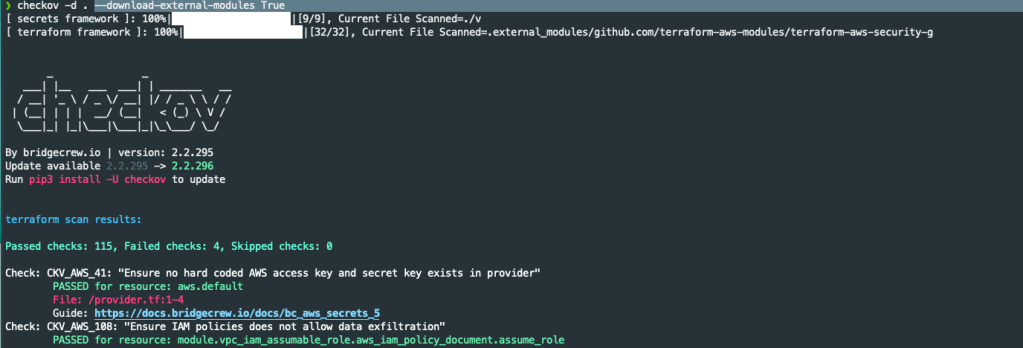
The first concern triggered flagged by Checkov is caused when enabling the option for VPC flow logging. The VPC modules creates an IAM role for logging that is not constrained to a Cloudwatch log group and stream.
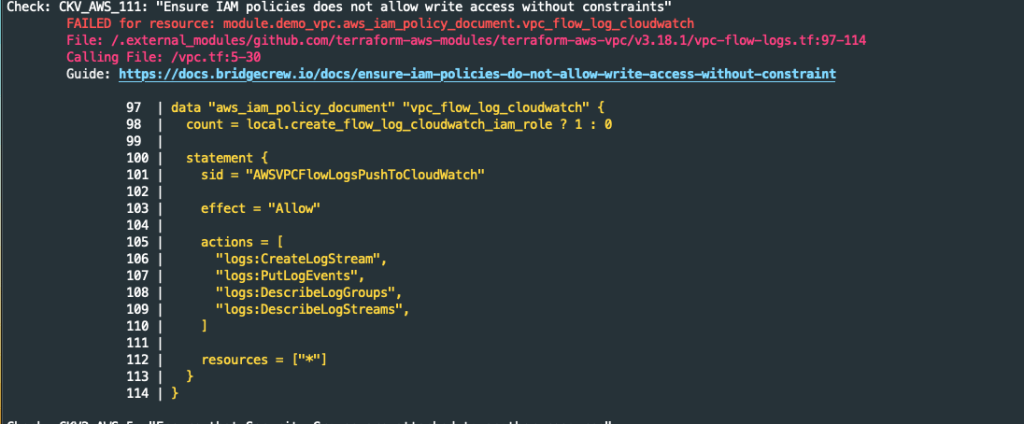
There is no facility within the Terraform module to restrict the logging to a log group and stream. How do we reduce/mitigate this risk? We use permission boundaries.
The second concert is in relation to the security groups created.
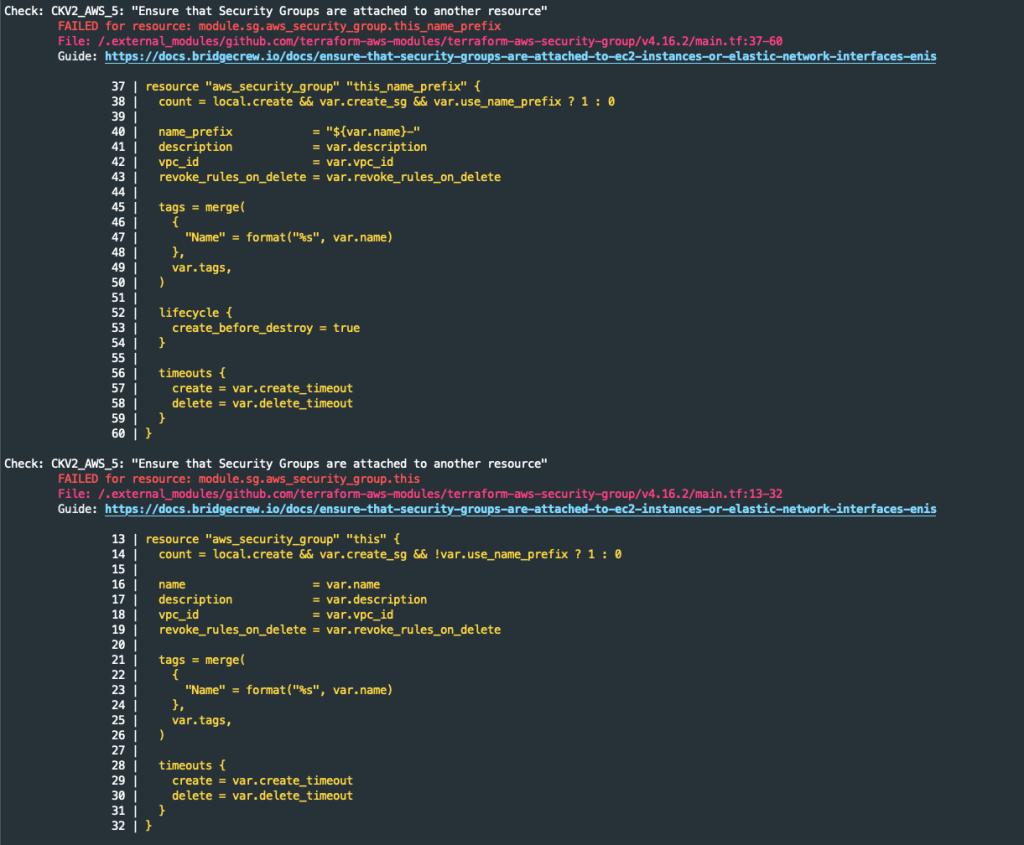
Checkov has found two security groups not attached to an EC2 instance or Elastic IP address. According to the Checkov website, this concert is low severity. Checkov is throwing a false positive alert here as the security group will be attached to the vpc interfaces. We will need to suppress the false alerts by adding ‘#checkov:skip=CKV2_AWS_5: “Ensure that Security Groups are attached to another resource”‘ to the module code.
The third Checkov message is related to the VPC creation process. When you create a new VPC, AWS creates a default security group with unrestricted traffic flow.
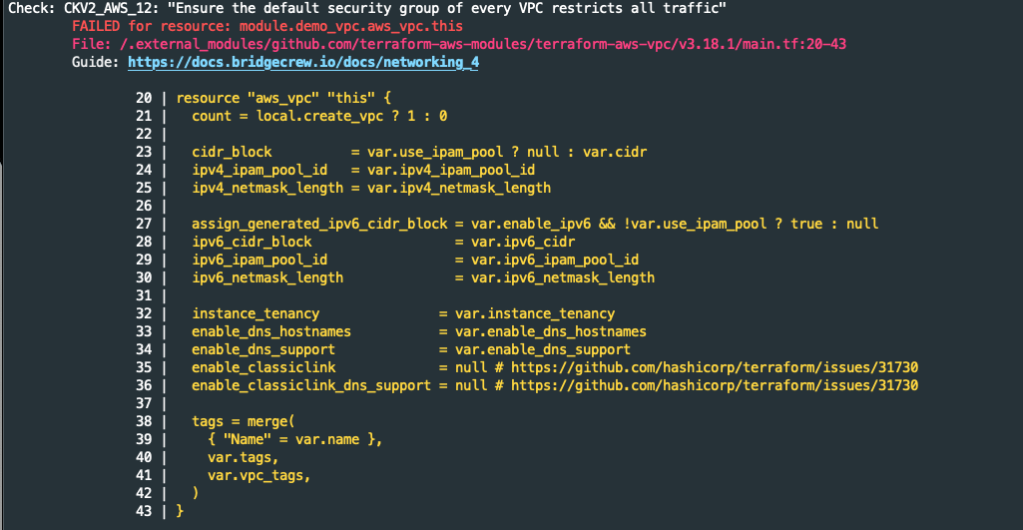
This default security group is not attached to any object but is still an unwanted risk. How do we reduce/mitigate the risk? We can’t delete the VPC default security group, but we can remove all ingress and egress rules so no traffic flows through it.
These migrations and improvements have been applied to the folder labelled post-scan-updates in github repository. Results from scanning the post-scan-updates folder code is shown below. Note, as we added some mitigations, more rules were enabled for scanning.


Even though Checkov was not 100% accurate in its findings, it did alert us to several security issues with the associated Terraform modules (i.e default VPC security group was unconstrained and the VPC flow logs role permissions allows logging to all log streams). I suspect Checkov would produce less false alerts if we had used native Terraform code without any Terraform modules. The information provided by Checkov allowed us to apply some mitigations to improve our security posture. Going forward, security linting tools such as Checkov will help us to improve our code security.
Note, the code in the ‘post-scan-updates’ subfolder in the GitHub repo will be reused in future posts.
 AWS Cloud DevOps