
As the title implies, this is part two in a series of blogs on AWS Windows EC2 backups. The blog for part one can be found here.
In part one, we demonstrated how to:
- Create a KMS key for the primary Backup Vault
- Create a Primary Backup Vault and encrypt it with our KMS key
- Create a KMS key in our DR region for the DR Backup Vault
- Create a Backup Vault in our DR region and encrypt with our DR KMS key
- Create two backup plans
- Create a backup selection policy based on tags
In part two, we will;
- Deploy our test EC2 instance
- Install the VSS backup component in the EC2 instance
- Tag our EC2 instance appropriately to enable backup targeting
- Create an SNS topic for backup notifications
- Create Cloudwatch rules for backup observability
We want to make the enablement of backups as easy as possible for our admins. In this solution we can enable backups of our EC2 instance by adding a specific tag to the instance e.g. “backuptier : 2VSS” as shown below.
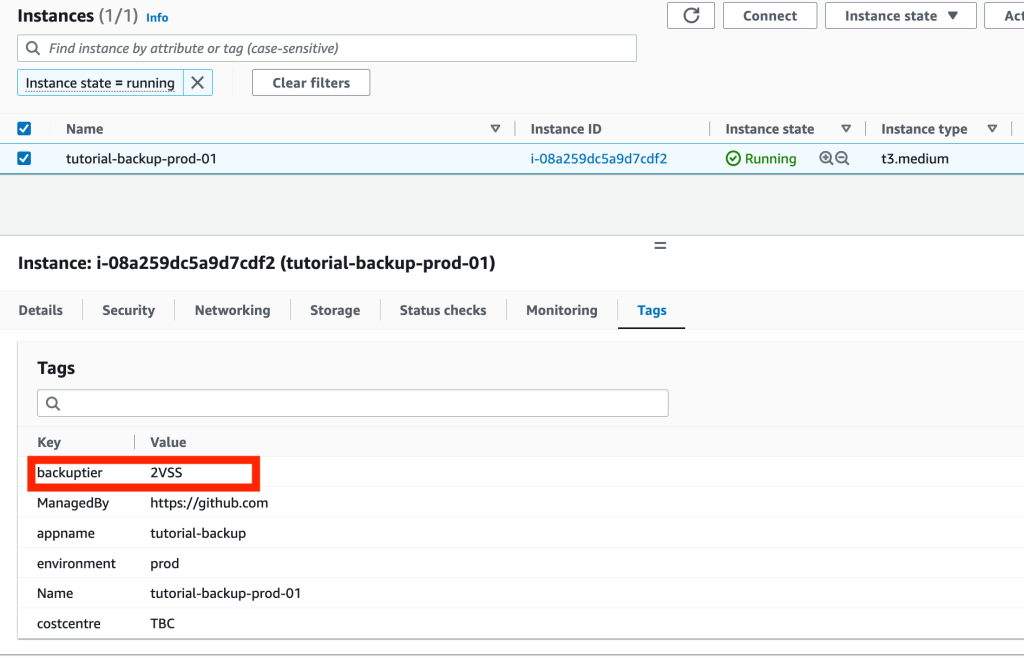
Similarly the backups can be halted/paused (but remain in the Backup Vault for their lifecycle) by removing the backuptier tag.
The view of the final infrastructure is shown below:

The code to deploy the infrastructure above is located in a github repository here. Note, the new files for part two have a suffix “_part2” in their file name. Note, the code in the github repository will deploy all components from parts and one and two; and will create the following additional components for part two:
- VPC in the primary region
- New KMS key for disk encryption (this key is multi region)
- EC2 Windows instance
- Role for the EC2 Instance profile
- Cloudwatch Alarms that will alert when backups are completed, failed or restored
- SNS topic for receiving the backup notifications from Cloudwatch Alarms
- VPC in DR region (to test restores)
- Replica of the KMS key (used to encrypt the EC2 disks in the primary region) in the DR region
The EC2 instance has two attached volumes, both are encrypted with a multi region KMS key. The userdata will download the vss backup component and install it. The EC2 instance will be tagged “backuptier : 2VSS” which means the Backup Selection policy will add it to the backups.

The Backup Selection policy will target EC2 instances tagged as “backuptier : 2VSS” to the tier2-vss backup plan. This Backup Plan has four rules. The first rule is for daily backups with a retention period of 32 days. The second rule is for weekly backups with a retention period of 57 days. This rule will also copy the weekly backups to the DR vault and retain the backup for 8 days in the DR vault. The third and forth rules are for monthly and quarterly backups.
After you deploy the infrastructure you will see the daily backups and weekly backups (on Saturday or Friday depending on your time zone) in the primary region. You can open the primary Backup Vault and inspect the recovery points as shown below:
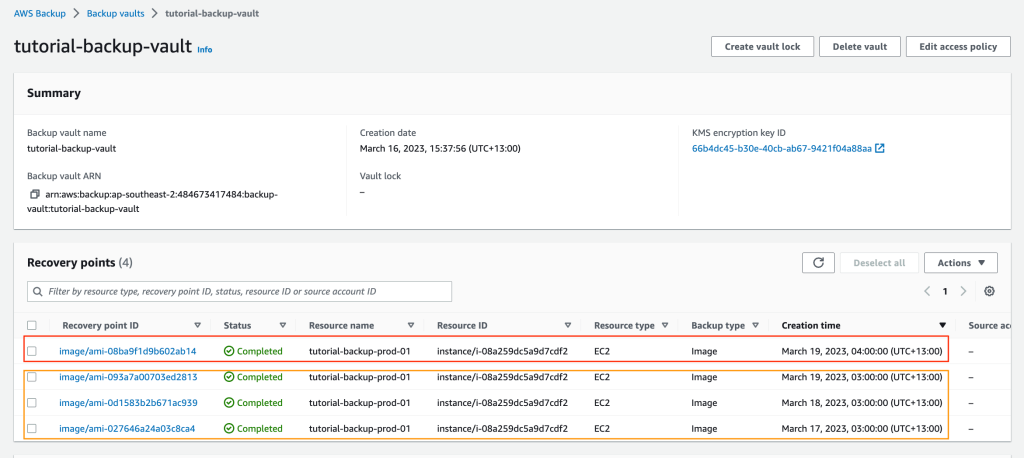
In the diagram above, the weekly backup is in the red box and the three daily backups are in the orange box.
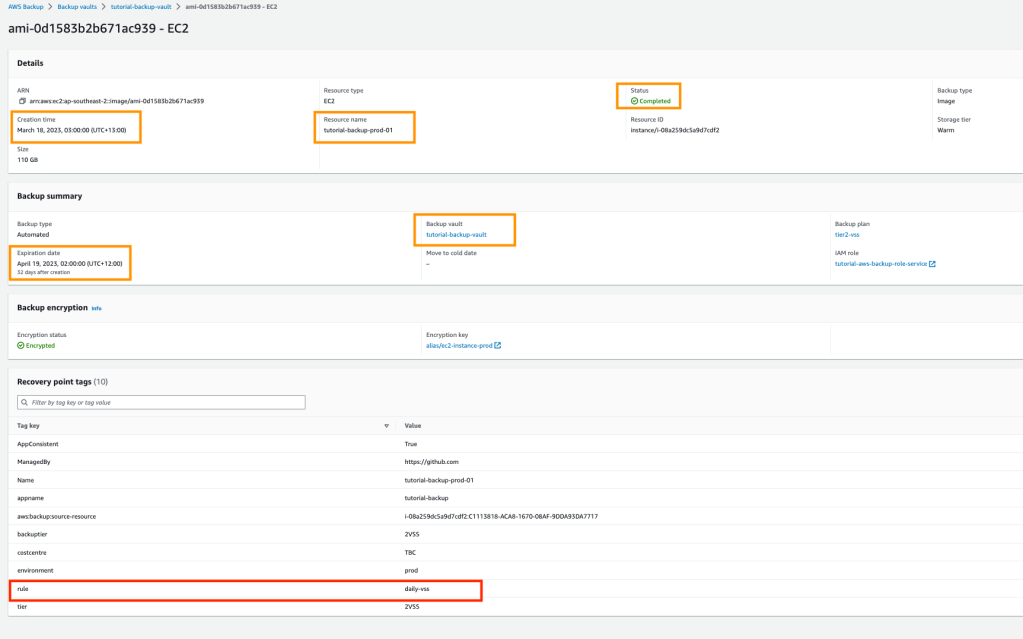
You can look at the tags on each recovery point to determine which rule (red rectangle in the screenshot below) was used to create the backup.
The weekly backups will be copied to the DR vault.

If you have subscribed to the SNS topic, you will receive an email notification with some JSON text (see below) which confirms the backup completed successfully.
{
  "version": "0",
  "id": "fa03a516-64d3-feea-b667-73ea506b73cc",
  "detail-type": "Backup Job State Change",
  "source": "aws.backup",
  "account": "484673417484",
  "time": "2023-03-17T14:24:02Z",
  "region": "ap-southeast-2",
  "resources": [
    "arn:aws:ec2:ap-southeast-2::image/ami-0d1583b2b671ac939"
  ],
  "detail": {
    "backupJobId": "C1113818-ACA8-1670-08AF-9DDA93DA7717",
    "backupSizeInBytes": "118111600640",
    "backupVaultArn": "arn:aws:backup:ap-southeast-2:484673417484:backup-vault:tutorial-backup-vault",
    "backupVaultName": "tutorial-backup-vault",
    "bytesTransferred": "0",
    "creationDate": "2023-03-17T14:00:00Z",
    "iamRoleArn": "arn:aws:iam::484673417484:role/tutorial-aws-backup-role-service",
    "resourceArn": "arn:aws:ec2:ap-southeast-2:484673417484:instance/i-08a259dc5a9d7cdf2",
    "resourceType": "EC2",
    "state": "COMPLETED",
    "completionDate": "2023-03-17T14:16:58.944Z",
    "startBy": "2023-03-17T15:00:00Z",
    "percentDone": 0,
    "createdBy": {
      "backupPlanId": "0a297803-638b-4b06-8dfd-a79105b6bf1f",
      "backupPlanArn": "arn:aws:backup:ap-southeast-2:484673417484:backup-plan:0a297803-638b-4b06-8dfd-a79105b6bf1f",
      "backupPlanVersion": "NGIyODU4YzItOTZhMi00YjdlLWI1M2MtZDhmOWU5MGY4YjRl",
      "backupPlanRuleId": "df8c10d8-aa3c-4747-9f8c-2b989c3a8bab"
    }
  }
}
Once the backup is available in your DR vault you will be able to restore the backup to the VPC created in the DR Region.
The new files associated with part two in the Github repository are detailed below:
cloudwatch_part2.tf: cloudwatch event rules to alert when backups have completed successfully, failed, or when restores are completed.
#------------------------------------------------------------------------------
# Cloudwatch Events
#------------------------------------------------------------------------------
resource "aws_cloudwatch_event_rule" "backup_completed_event_rule" {
  name        = "backup-event-backup-job-completed"
  description = "Completed backup events - testing only otherwise too much noise"

  event_pattern = <<PATTERN
{
  "source": ["aws.backup"],
  "detail-type": ["Backup Job State Change"],
  "detail": {
    "state": ["COMPLETED"]
  }
}
PATTERN
}

resource "aws_cloudwatch_event_target" "sns_backup_completed" {
  rule = aws_cloudwatch_event_rule.backup_completed_event_rule.name
  arn  = aws_sns_topic.backup_sns_topic.arn
}

resource "aws_cloudwatch_event_rule" "backup_failed_event_rule" {
  name        = "backup-event-backup-job-failed"
  description = "failed backup events"

  event_pattern = <<PATTERN
{
  "source": ["aws.backup"],
  "detail-type": ["Backup Job State Change"],
  "detail": {
    "state": ["FAILED"]
  }
}
PATTERN
}

resource "aws_cloudwatch_event_target" "sns_backup_failed" {
  rule = aws_cloudwatch_event_rule.backup_failed_event_rule.name
  arn  = aws_sns_topic.backup_sns_topic.arn
}

resource "aws_cloudwatch_event_rule" "restored_completed_event_rule" {
  name        = "backup-event-restore-completed"
  description = "Restore completed event"

  event_pattern = <<PATTERN
{
  "source": ["aws.backup"],
  "detail-type": ["Restore Job State Change"],
  "detail": {
    "state": ["COMPLETED"]
  }
}
PATTERN
}

resource "aws_cloudwatch_event_target" "sns_restore_completed" {
  rule = aws_cloudwatch_event_rule.restored_completed_event_rule.name
  arn  = aws_sns_topic.backup_sns_topic.arn
}
ec2_part2.tf: Create an EC2 instance for backup testing. This server has two disks which are encrypted with a multi region KMS key. We will install the VSS component at creation and set its backup to follow tier-2vss backup plan.
#-------------------------------------------------------------------
# Tutorial Backup Server Configuration
#-------------------------------------------------------------------
module "tutorial_backup_server01" {
  source     = "terraform-aws-modules/ec2-instance/aws"
  version    = "3.5.0"
  depends_on = [module.tutorial_backup_ec2_assumable_role]

  #checkov:skip=CKV_AWS_8: "Ensure all data stored in the Launch configuration or instance Elastic Blocks Store is securely encrypted"
  #checkov:skip=CKV_AWS_126: "Ensure that detailed Backup is enabled for EC2 instances"
  #checkov:skip=CKV_AWS_79: "Ensure Instance Metadata Service Version 1 is not enabled"


  name = "${var.ec2_app_name}-${var.environment}-01"

  ami                         = data.aws_ami.windows-server-2022.id
  instance_type               = "t3.medium"
  subnet_id                   = module.tutorial_backup_vpc.private_subnets[0]
  availability_zone           = module.tutorial_backup_vpc.azs[0]
  associate_public_ip_address = false
  vpc_security_group_ids      = [module.tutorial_server_sg.security_group_id]
  iam_instance_profile        = module.tutorial_backup_ec2_assumable_role.iam_instance_profile_id
  user_data_base64            = base64encode(local.user_data_prod)

  disable_api_termination = false


  enable_volume_tags = false
  root_block_device = [
    {
      volume_type = "gp3"
      volume_size = 80
      encrypted   = true
      kms_key_id  = aws_kms_key.tutorial_backup_ec2_kms_key.arn

      tags = {
        Name = "Tutorial-Backup-C-Drive"
      }
    },
  ]

  tags = merge(local.tags_generic, local.tags_ec2)

}

resource "aws_ebs_volume" "tutorial_backup_d_drive" {

  size              = 30
  type              = "gp3"
  availability_zone = module.tutorial_backup_vpc.azs[0]
  encrypted         = true
  kms_key_id        = aws_kms_key.tutorial_backup_ec2_kms_key.arn

  tags = {
    Name = "tutorial-backup-D-Drive"
  }

}

resource "aws_volume_attachment" "tutorial_backup_d_drive_attachment" {

  device_name = "/dev/xvdf"
  volume_id   = aws_ebs_volume.tutorial_backup_d_drive.id
  instance_id = module.tutorial_backup_server01.id

}
iam_part2.tf: IAM policy for EC2 role, boundary policy for VPC flow log role.
#------------------------------------------------------------------------------
# IAM Roles
#------------------------------------------------------------------------------

resource "aws_iam_policy" "vpc_flow_logging_boundary_role_policy" {
  name   = "vpc-flow-logging-boundary-policy"
  path   = "/"
  policy = data.aws_iam_policy_document.vpc_flow_logging_boundary_role_doc.json

}


resource "random_id" "random_id" {
  byte_length = 5

}


module "tutorial_backup_ec2_assumable_role" {
  source  = "terraform-aws-modules/iam/aws//modules/iam-assumable-role"
  version = "5.9.0"

  trusted_role_services = [
    "ec2.amazonaws.com"
  ]

  role_requires_mfa       = false
  create_role             = true
  create_instance_profile = true

  role_name = "${var.ec2_app_name}-ec2-assumable-role-${random_id.random_id.hex}"

  custom_role_policy_arns = [
    "arn:aws:iam::aws:policy/AmazonSSMManagedInstanceCore",

  ]

}

resource "aws_iam_policy" "ec2_backup_policy" {
  name   = "${var.ec2_app_name}-ec2-backup-install-policy"
  path   = "/"
  policy = data.aws_iam_policy_document.ec2_backup_doc.json

}

resource "aws_iam_role_policy_attachment" "ec2_backup_policy_attachement" {
  role       = module.tutorial_backup_ec2_assumable_role.iam_role_name
  policy_arn = aws_iam_policy.ec2_backup_policy.arn
}
kms_part2.tf: KMS key for EC2 volume encryption. Creation of KMS key replica in the DR region.
resource "aws_kms_key" "tutorial_backup_ec2_kms_key" {
  description         = "KMS Keys for Tutorial-Backup EBS Encryption"
  is_enabled          = true
  enable_key_rotation = true
  multi_region        = true

  tags = merge(local.tags_generic, local.tag_backup)


  policy = <<EOF
{
    "Version": "2012-10-17",
    "Statement": [
        {
            "Sid": "Enable IAM User Permissions",
            "Effect": "Allow",
            "Principal": {
                "AWS": "arn:aws:iam::${data.aws_caller_identity.current.account_id}:root"
            },
            "Action": "kms:*",
            "Resource": "*"
        },

        {
            "Sid": "Allow access for Key Administrators",
            "Effect": "Allow",
            "Principal": {
                "AWS": "arn:aws:iam::${data.aws_caller_identity.current.account_id}:root"
            },
            "Action": [
                "kms:Create*",
                "kms:Describe*",
                "kms:Enable*",
                "kms:List*",
                "kms:Put*",
                "kms:Update*",
                "kms:Revoke*",
                "kms:Disable*",
                "kms:Get*",
                "kms:Delete*",
                "kms:TagResource",
                "kms:UntagResource",
                "kms:ScheduleKeyDeletion",
                "kms:CancelKeyDeletion"
            ],
            "Resource": "*"
        },
        {
            "Sid": "Allow use of the key",
            "Effect": "Allow",
            "Principal": {
                 "AWS": [
                    "arn:aws:iam::${data.aws_caller_identity.current.account_id}:root"
                ]
            },
            "Action": [
                "kms:Encrypt",
                "kms:Decrypt",
                "kms:ReEncrypt*",
                "kms:GenerateDataKey*",
                "kms:DescribeKey"
            ],
            "Resource": "*"
        },
        {
            "Sid": "Allow attachment of persistent resources",
            "Effect": "Allow",
            "Principal": {
                "AWS": [
                    "arn:aws:iam::${data.aws_caller_identity.current.account_id}:root"
                ]
            },
            "Action": [
                "kms:CreateGrant",
                "kms:ListGrants",
                "kms:RevokeGrant"
            ],
            "Resource": "*",
            "Condition": {
                "Bool": {
                    "kms:GrantIsForAWSResource": "true"
                }
            }
        }
    ]
}
EOF
}

resource "aws_kms_alias" "tutorial_backup_ec2_kms_alias" {
  target_key_id = aws_kms_key.tutorial_backup_ec2_kms_key.key_id
  name          = "alias/ec2-instance-${var.environment}"
}


resource "aws_kms_replica_key" "ec2_dr_key_replica" {
  provider = aws.dr-region

  description             = "Multi-Region replica key"
  deletion_window_in_days = 7
  primary_key_arn         = aws_kms_key.tutorial_backup_ec2_kms_key.arn
}
security_groups_part2.tf: Various Security Groups for the overall solution.
#------------------------------------------------------------------------------
# Security Groups - SSM
#------------------------------------------------------------------------------
module "https_443_security_group" {
  source  = "terraform-aws-modules/security-group/aws//modules/https-443"
  version = "4.16.2"
  # Ignoring Checkov secret_name false positive detection
  #checkov:skip=CKV2_AWS_5: "Ensure that Security Groups are attached to another resource"

  name        = "https-443-sg"
  description = "Allow https 443"
  vpc_id      = module.tutorial_backup_vpc.vpc_id

  # Allow ingress rules to be accessed only within current VPC
  ingress_cidr_blocks = [module.tutorial_backup_vpc.vpc_cidr_block]

  # Allow all rules for all protocols
  egress_rules = ["https-443-tcp"]

  tags = local.tags_generic
}

#------------------------------------------------------------------------------
# Restrict default VPC Security Group - Check: CKV2_AWS_12
#------------------------------------------------------------------------------

resource "aws_default_security_group" "default" {
  depends_on = [module.tutorial_backup_vpc]

  vpc_id = module.tutorial_backup_vpc.vpc_id

  ingress = []
  egress  = []

}

module "tutorial_server_sg" {
  source  = "terraform-aws-modules/security-group/aws"
  version = "4.9.0"

  name        = "${var.environment}-${var.ec2_app_name}-sg"
  description = "Security group for ${var.environment} ${var.ec2_app_name} Server"
  vpc_id      = module.tutorial_backup_vpc.vpc_id

  ingress_cidr_blocks = ["0.0.0.0/0"]
  ingress_rules       = ["https-443-tcp"]

  ingress_with_cidr_blocks = [
    {
      from_port   = 3389
      to_port     = 3389
      protocol    = "tcp"
      description = "RDP accdess of VPC"
      cidr_blocks = var.vpc_cidr_range
    },

  ]
  egress_cidr_blocks = ["0.0.0.0/0"]
  egress_rules       = ["https-443-tcp", "http-80-tcp"]


  egress_with_cidr_blocks = [
    {
      rule        = "all-tcp"
      cidr_blocks = var.vpc_cidr_range
      description = "VPC Access"
    },
  ]

  tags = merge(local.tags_generic)
}

#------------------------------------------------------------------------------
# DR Security Groups
#------------------------------------------------------------------------------

module "https_443_security_group_dr" {
  source  = "terraform-aws-modules/security-group/aws//modules/https-443"
  version = "4.16.2"

  providers = {
    aws = aws.dr-region
  }

  # Ignoring Checkov secret_name false positive detection
  #checkov:skip=CKV2_AWS_5: "Ensure that Security Groups are attached to another resource"

  name        = "https-443-sg-dr"
  description = "Allow https 443"
  vpc_id      = module.tutorial_backup_dr_vpc.vpc_id

  # Allow ingress rules to be accessed only within current VPC
  ingress_cidr_blocks = [module.tutorial_backup_vpc.vpc_cidr_block]

  # Allow all rules for all protocols
  egress_rules = ["https-443-tcp"]

  tags = local.tags_generic
}

resource "aws_default_security_group" "default_dr" {
  depends_on = [module.tutorial_backup_dr_vpc]
  provider   = aws.dr-region

  vpc_id = module.tutorial_backup_dr_vpc.vpc_id

  ingress = []
  egress  = []

}
sns_part2.tf: SNS topic to receive backup alerts from Cloudwatch event rules.
#------------------------------------------------------------------------------
# SNS
#------------------------------------------------------------------------------

resource "aws_sns_topic" "backup_sns_topic" {
  name = "backup-alerts"
}

resource "aws_sns_topic_policy" "sns_backup_policy" {
  arn    = aws_sns_topic.backup_sns_topic.arn
  policy = data.aws_iam_policy_document.backup_sns_topic_policy.json
}

data "aws_iam_policy_document" "backup_sns_topic_policy" {
  statement {
    effect  = "Allow"
    actions = ["SNS:Publish"]

    principals {
      type        = "Service"
      identifiers = ["events.amazonaws.com"]
    }

    resources = [aws_sns_topic.backup_sns_topic.arn]
  }
}
ssm_part2.tf: SSM endpoints for remote access.
#------------------------------------------------------------------------------
# VPC - SSM Endpoints
#------------------------------------------------------------------------------
module "vpc_ssm_endpoint" {

  source  = "terraform-aws-modules/vpc/aws//modules/vpc-endpoints"
  version = "3.13.0"

  vpc_id             = module.tutorial_backup_vpc.vpc_id
  security_group_ids = [module.https_443_security_group.security_group_id]

  endpoints = {
    ssm = {
      service             = "ssm"
      private_dns_enabled = true
      subnet_ids          = module.tutorial_backup_vpc.private_subnets
      tags                = merge(local.tags_generic, local.tags_ssm_ssm)
    },
    ssmmessages = {
      service             = "ssmmessages"
      private_dns_enabled = true,
      subnet_ids          = module.tutorial_backup_vpc.private_subnets
      tags                = merge(local.tags_generic, local.tags_ssm_ssmmessages)
    },
    ec2messages = {
      service             = "ec2messages",
      private_dns_enabled = true,
      subnet_ids          = module.tutorial_backup_vpc.private_subnets
      tags                = merge(local.tags_generic, local.tags_ssm_ec2messages)
    }
  }
}


module "vpc_ssm_endpoint_dr" {

  source  = "terraform-aws-modules/vpc/aws//modules/vpc-endpoints"
  version = "3.13.0"

  providers = {
    aws = aws.dr-region
  }

  vpc_id             = module.tutorial_backup_dr_vpc.vpc_id
  security_group_ids = [module.https_443_security_group_dr.security_group_id]

  endpoints = {
    ssm = {
      service             = "ssm"
      private_dns_enabled = true
      subnet_ids          = module.tutorial_backup_dr_vpc.private_subnets
      tags                = merge(local.tags_generic, local.tags_ssm_ssm)
    },
    ssmmessages = {
      service             = "ssmmessages"
      private_dns_enabled = true,
      subnet_ids          = module.tutorial_backup_dr_vpc.private_subnets
      tags                = merge(local.tags_generic, local.tags_ssm_ssmmessages)
    },
    ec2messages = {
      service             = "ec2messages",
      private_dns_enabled = true,
      subnet_ids          = module.tutorial_backup_dr_vpc.private_subnets
      tags                = merge(local.tags_generic, local.tags_ssm_ec2messages)
    }
  }
}
vpc_part2.tf: VPCs in Sydney (primary region) and Singapore (DR) regions.
#------------------------------------------------------------------------------
# VPC Module
#------------------------------------------------------------------------------
module "tutorial_backup_vpc" {
  source  = "terraform-aws-modules/vpc/aws"
  version = "3.18.1"
  # Ignoring Checkov mitigation via boundary rule added, checkov unable logging enabled in module
  #checkov:skip=CKV_AWS_111: "Ensure IAM policies does not allow write access without constraints"
  #checkov:skip=CKV2_AWS_11: "Ensure VPC flow logging is enabled in all VPCs"
  #checkov:skip=CKV2_AWS_19: "Ensure that all EIP addresses allocated to a VPC are attached to EC2 instances"
  #checkov:skip=CKV2_AWS_12: "Ensure the default security group of every VPC restricts all traffic"
  #checkov:skip=CKV_AWS_130: "Ensure VPC subnets do not assign public IP by default"

  name = "${var.ec2_app_name}-${var.environment}-vpc"
  cidr = var.vpc_cidr_range

  azs             = ["${var.region}a"]
  private_subnets = var.private_subnets_list
  public_subnets  = var.public_subnets_list


  enable_flow_log                      = true
  create_flow_log_cloudwatch_log_group = true
  create_flow_log_cloudwatch_iam_role  = true
  vpc_flow_log_permissions_boundary    = aws_iam_policy.vpc_flow_logging_boundary_role_policy.arn
  flow_log_max_aggregation_interval    = 60

  create_igw         = true
  enable_nat_gateway = true
  enable_ipv6        = false

  enable_dns_hostnames = true
  enable_dns_support   = true

  #tags = local.tags_generic

}

module "tutorial_backup_dr_vpc" {
  source  = "terraform-aws-modules/vpc/aws"
  version = "3.18.1"

  providers = {
    aws = aws.dr-region
  }

  # Ignoring Checkov mitigation via boundary rule added, checkov unable logging enabled in module
  #checkov:skip=CKV_AWS_111: "Ensure IAM policies does not allow write access without constraints"
  #checkov:skip=CKV2_AWS_11: "Ensure VPC flow logging is enabled in all VPCs"
  #checkov:skip=CKV2_AWS_19: "Ensure that all EIP addresses allocated to a VPC are attached to EC2 instances"
  #checkov:skip=CKV2_AWS_12: "Ensure the default security group of every VPC restricts all traffic"
  #checkov:skip=CKV_AWS_130: "Ensure VPC subnets do not assign public IP by default"

  name = "${var.ec2_app_name}-${var.environment}-dr-vpc"
  cidr = var.vpc_cidr_range_dr

  azs             = ["${var.region_dr}a"]
  private_subnets = var.private_subnets_dr_list
  public_subnets  = var.public_subnets_dr_list


  enable_flow_log                      = false
  create_flow_log_cloudwatch_log_group = false
  create_flow_log_cloudwatch_iam_role  = false

  create_igw         = true
  enable_nat_gateway = true
  enable_ipv6        = false

  enable_dns_hostnames = true
  enable_dns_support   = true

}
Hopefully this blog series has given you a greater insight into AWS EC2 Windows backups. One thing I did notice is that when I restored my instance from the DR vault, the restored EC2 instance volumes were encrypted with the DR vault KMS key. I will need to investigate and clarify if this is normal behaviour. However, the restored instance does start up successfully in the DR region.
 AWS Cloud DevOps