

This is a continuation from my previous blog photo-uploader ( https://devbuildit.com/2025/10/27/photo-upload-app/ ). There is a slight rebranding in the title to reflect the new application capabilities i.e. upload photos and get back macro nutrient data overlaid onto the original photo upload.
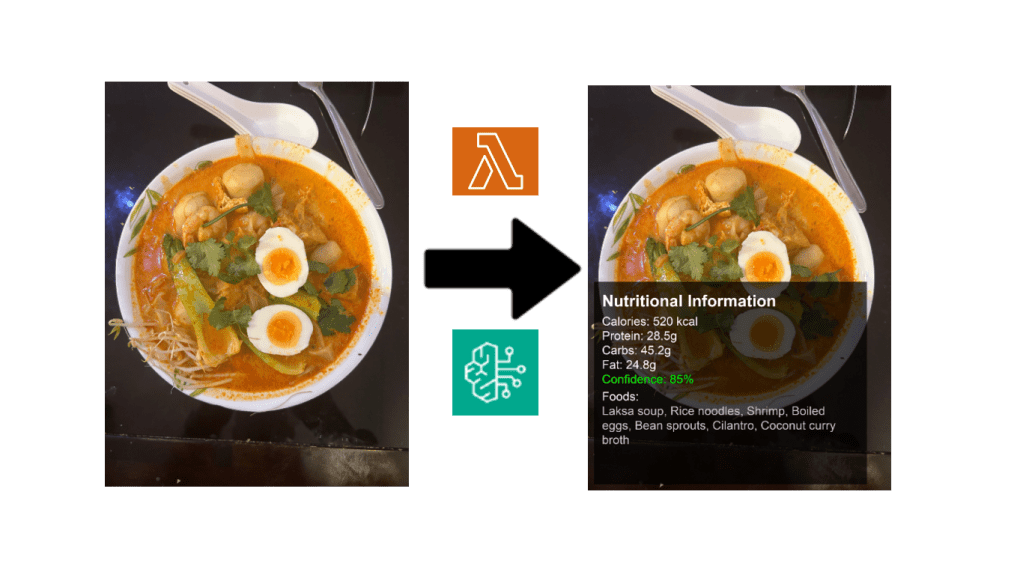
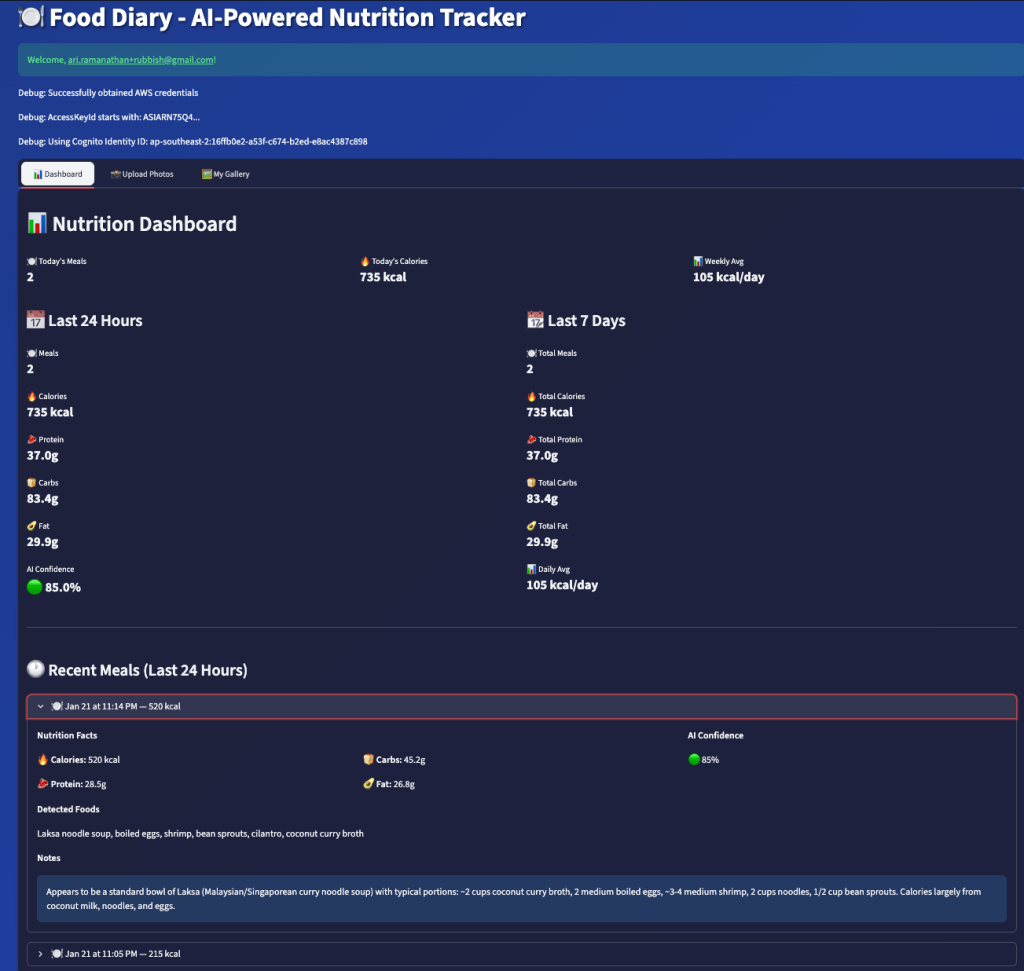
Another new feature in this version is a Streamlit dashboard that displays 24 hour and 7 day macro nutrient totals, which are derived from data received from the model. The model data is persistently stored in an Amazon DynamoDB table.
This version builds on the elements from the first blog i.e.
- Streamlit Client App running on a local device.
- Amazon Cognito for user registration and authentication.
- Amazon S3 for object storage.
- Python virtual environment.
These components will not be discussed in detail here as they are already described in part 1. The following AWS components were added for this version:
- Second Amazon S3 bucket for processed image storage.
- Amazon Lambda function with layers (Pillow dependencies aren’t in the Lambda’s standard runtime).
- Amazon Bedrock Claude Model.
- Amazon DynamoDB to store image macro nutrient data.
- Amazon Budget alert (Bedrock can get pricy).
- Amazon CloudWatch dashboard.
- Streamlit dashboard to display statistics.
The code that is discussed below can be found on my GitHub page (https://github.com/arinzl/aws-food-diary-part2). There are three deployment components: Lambda function staging area; Terraform code and local Streamlit application.
Deployment
Note, the following deployment steps are based on MacOS, adjust commands for your OS if required.
The code repository is separated into three sections:
- Lambda preparation area (folder lambda).
- Terraform code (folder tf).
- Streamlit Application (folder app).
Local device changes & TF Lambda ZIP creation
Clone the repository onto your local device.
We will need to install some Python dependencies on your local device to run Streamlit. From the project root, create a virtual environment and install the Python dependencies:
python3 -m venv .venv
source .venv/bin/activate
python3 --version
The reported Python version should be 3.12+. We will create the ZIP files for the lambda function.
cd lambda
pip install -r requirements.txt
chmod +x build_pillow_lambda_layer.sh
./build_pillow_lambda_layer.sh
zip -r lambda_package.zip lambda_function.py nutrition_analyser.py image_processor.py dynamodb_client.py
cp lambda_package.zip ../tf/
The above command will create two zip files in the tf folder. We will now deploy the AWS resources via Terraform. The tf folder contains the following Terraform files:
cognito.tf – creates: Cognito User Pool with password policy and defines email as schema attribute; Cognito User Pool client with client secret and OAuth enabled; Cognito domain for the User Pool, Cognito Identity Pool linked to the User Pool.
# Cognito User Pool for user authentication
resource "aws_cognito_user_pool" "main" {
  name = "${var.app_name}-user-pool"

  # Username configuration
  username_attributes      = ["email"]
  auto_verified_attributes = ["email"]

  # Password policy
  password_policy {
    minimum_length    = 8
    require_lowercase = true
    require_uppercase = true
    require_numbers   = true
  }

  # User attributes
  schema {
    name                = "email"
    attribute_data_type = "String"
    required            = true
    mutable             = true

    string_attribute_constraints {
      min_length = 1
      max_length = 256
    }
  }

  tags = {
    Name        = "${var.app_name}-user-pool"
    Environment = var.environment
  }
}

# Cognito User Pool Client for OAuth
resource "aws_cognito_user_pool_client" "main" {
  name         = "${var.app_name}-client"
  user_pool_id = aws_cognito_user_pool.main.id

  # OAuth configuration
  allowed_oauth_flows_user_pool_client = true
  allowed_oauth_flows                  = ["code"]
  allowed_oauth_scopes                 = ["openid", "email", "profile"]
  callback_urls                        = var.cognito_callback_urls
  logout_urls                          = var.cognito_logout_urls

  # Supported identity providers
  supported_identity_providers         = ["COGNITO"]

  # Token validity
  id_token_validity      = 60
  access_token_validity  = 60
  refresh_token_validity = 30

  token_validity_units {
    id_token      = "minutes"
    access_token  = "minutes"
    refresh_token = "days"
  }

  # Generate client secret for server-side OAuth
  generate_secret = true

  # Auth flows
  explicit_auth_flows = [
    "ALLOW_USER_SRP_AUTH",
    "ALLOW_REFRESH_TOKEN_AUTH"
  ]

  # Prevent user existence errors
  prevent_user_existence_errors = "ENABLED"

  # Enable token revocation
  enable_token_revocation = true

  # Read/write attributes
  read_attributes = [
    "email",
    "email_verified"
  ]

  write_attributes = [
    "email"
  ]
}

# Cognito User Pool Domain
# Note: Uses aws_caller_identity data source defined in provider.tf
resource "aws_cognito_user_pool_domain" "main" {
  domain       = "${var.app_name}-${data.aws_caller_identity.current.account_id}"
  user_pool_id = aws_cognito_user_pool.main.id
}

# Cognito Identity Pool for authenticated users
resource "aws_cognito_identity_pool" "main" {
  identity_pool_name               = "${var.app_name}-${var.environment}"
  allow_unauthenticated_identities = false

  # Link User Pool with Identity Pool
  cognito_identity_providers {
    client_id               = aws_cognito_user_pool_client.main.id
    provider_name           = aws_cognito_user_pool.main.endpoint
    server_side_token_check = false
  }

  tags = {
    Name        = "${var.app_name}-identity-pool"
    Environment = var.environment
  }
}

# Attach IAM roles to the identity pool
resource "aws_cognito_identity_pool_roles_attachment" "main" {
  identity_pool_id = aws_cognito_identity_pool.main.id

  roles = {
    "authenticated" = aws_iam_role.authenticated.arn
  }
}
dynamodb.tf – creates: DynamoDB table for persistently storing macro nutrition metadata.
# DynamoDB table for storing nutrition metadata
resource "aws_dynamodb_table" "nutrition_metadata" {
  name           = "${var.app_name}-nutrition-metadata"
  billing_mode   = "PAY_PER_REQUEST"
  hash_key       = "userId"
  range_key      = "imageKey"

  attribute {
    name = "userId"
    type = "S"
  }

  attribute {
    name = "imageKey"
    type = "S"
  }

  attribute {
    name = "timestamp"
    type = "N"
  }

  # Global secondary index for querying by timestamp
  global_secondary_index {
    name            = "userId-timestamp-index"
    hash_key        = "userId"
    range_key       = "timestamp"
    projection_type = "ALL"
  }

  tags = {
    Name        = "${var.app_name}-nutrition-metadata"
    Environment = var.environment
  }
}
iam.tf – IAM role and policies that authenticated Cognito users will assume.
# IAM role for authenticated Cognito users
resource "aws_iam_role" "authenticated" {
  name = "${var.app_name}-authenticated-role"

  assume_role_policy = jsonencode({
    Version = "2012-10-17"
    Statement = [
      {
        Action = "sts:AssumeRoleWithWebIdentity"
        Effect = "Allow"
        Principal = {
          Federated = "cognito-identity.amazonaws.com"
        }
        Condition = {
          StringEquals = {
            "cognito-identity.amazonaws.com:aud" = aws_cognito_identity_pool.main.id
          }
          "ForAnyValue:StringLike" = {
            "cognito-identity.amazonaws.com:amr" = "authenticated"
          }
        }
      }
    ]
  })
}

# Policy for original bucket access
resource "aws_iam_role_policy" "authenticated_original_s3_access" {
  name = "${var.app_name}-authenticated-original-s3"
  role = aws_iam_role.authenticated.id

  policy = jsonencode({
    Version = "2012-10-17"
    Statement = [
      {
        Effect = "Allow"
        Action = [
          "s3:ListBucket"
        ]
        Resource = [
          aws_s3_bucket.photos.arn
        ]
        Condition = {
          StringLike = {
            "s3:prefix" = ["users/$${cognito-identity.amazonaws.com:sub}/*"]
          }
        }
      },
      {
        Effect = "Allow"
        Action = [
          "s3:PutObject",
          "s3:GetObject",
          "s3:DeleteObject"
        ]
        Resource = [
          "${aws_s3_bucket.photos.arn}/users/$${cognito-identity.amazonaws.com:sub}/*"
        ]
      }
    ]
  })
}

# Policy for processed bucket access
resource "aws_iam_role_policy" "authenticated_processed_s3_access" {
  name = "${var.app_name}-authenticated-processed-s3"
  role = aws_iam_role.authenticated.id

  policy = jsonencode({
    Version = "2012-10-17"
    Statement = [
      {
        Effect = "Allow"
        Action = [
          "s3:ListBucket"
        ]
        Resource = [
          aws_s3_bucket.processed_photos.arn
        ]
        Condition = {
          StringLike = {
            "s3:prefix" = ["users/$${cognito-identity.amazonaws.com:sub}/*"]
          }
        }
      },
      {
        Effect = "Allow"
        Action = [
          "s3:GetObject"
        ]
        Resource = [
          "${aws_s3_bucket.processed_photos.arn}/users/$${cognito-identity.amazonaws.com:sub}/*"
        ]
      }
    ]
  })
}

# Policy for DynamoDB access
resource "aws_iam_role_policy" "authenticated_dynamodb_access" {
  name = "${var.app_name}-authenticated-dynamodb"
  role = aws_iam_role.authenticated.id

  policy = jsonencode({
    Version = "2012-10-17"
    Statement = [
      {
        Effect = "Allow"
        Action = [
          "dynamodb:Query",
          "dynamodb:GetItem"
        ]
        Resource = [
          aws_dynamodb_table.nutrition_metadata.arn,
          "${aws_dynamodb_table.nutrition_metadata.arn}/index/*"
        ]
        Condition = {
          "ForAllValues:StringEquals" = {
            "dynamodb:LeadingKeys" = ["$${cognito-identity.amazonaws.com:sub}"]
          }
        }
      }
    ]
  })
}
lambda.tf – creates: Lambda function, Lambda execution role, S3 lambda invoke rights, policy for Lambda execution role to access S3, Dynamo and Bedrock.
# Lambda execution IAM role
resource "aws_iam_role" "lambda_execution" {
  name = "${var.app_name}-lambda-execution-role"

  assume_role_policy = jsonencode({
    Version = "2012-10-17"
    Statement = [{
      Action = "sts:AssumeRole"
      Effect = "Allow"
      Principal = {
        Service = "lambda.amazonaws.com"
      }
    }]
  })
}

# CloudWatch Logs policy for Lambda
resource "aws_iam_role_policy_attachment" "lambda_logs" {
  role       = aws_iam_role.lambda_execution.name
  policy_arn = "arn:aws:iam::aws:policy/service-role/AWSLambdaBasicExecutionRole"
}

# Custom policy for Lambda to access S3, DynamoDB, and Bedrock
resource "aws_iam_role_policy" "lambda_custom_policy" {
  name = "${var.app_name}-lambda-custom-policy"
  role = aws_iam_role.lambda_execution.id

  policy = jsonencode({
    Version = "2012-10-17"
    Statement = [
      {
        # Read from original S3 bucket
        Effect = "Allow"
        Action = [
          "s3:GetObject"
        ]
        Resource = "${aws_s3_bucket.photos.arn}/users/*"
      },
      {
        # Write to processed S3 bucket
        Effect = "Allow"
        Action = [
          "s3:PutObject"
        ]
        Resource = "${aws_s3_bucket.processed_photos.arn}/users/*"
      },
      {
        # Write to DynamoDB
        Effect = "Allow"
        Action = [
          "dynamodb:PutItem",
          "dynamodb:UpdateItem"
        ]
        Resource = aws_dynamodb_table.nutrition_metadata.arn
      },
      {
        # Invoke Bedrock models
        Effect = "Allow"
        Action = [
          "bedrock:InvokeModel"
        ]
        Resource = "arn:aws:bedrock:${var.aws_region}::foundation-model/${var.bedrock_model_id}"
      },
      {
        # AWS Marketplace permissions for first-time Bedrock model access
        Effect = "Allow"
        Action = [
          "aws-marketplace:ViewSubscriptions",
          "aws-marketplace:Subscribe"
        ]
        Resource = "*"
      }
    ]
  })
}

# Lambda function for nutrition analysis
resource "aws_lambda_function" "nutrition_analyser" {
  filename      = "lambda_package.zip"
  function_name = "${var.app_name}-nutrition-analyser"
  role          = aws_iam_role.lambda_execution.arn
  handler       = "lambda_function.lambda_handler"
  runtime       = "python3.12"
  timeout       = 60
  memory_size   = 1024

  environment {
    variables = {
      PROCESSED_BUCKET_NAME = aws_s3_bucket.processed_photos.id
      DYNAMODB_TABLE_NAME   = aws_dynamodb_table.nutrition_metadata.name
      BEDROCK_MODEL_ID      = var.bedrock_model_id
    }
  }

  layers = [
    aws_lambda_layer_version.pillow_layer.arn
  ]

  source_code_hash = filebase64sha256("lambda_package.zip")

  tags = {
    Name        = "${var.app_name}-nutrition-analyser"
    Environment = var.environment
  }

  depends_on = [
    aws_iam_role_policy_attachment.lambda_logs,
    aws_iam_role_policy.lambda_custom_policy
  ]
}

# Lambda layer for Pillow
resource "aws_lambda_layer_version" "pillow_layer" {
  filename            = "pillow_layer.zip"
  layer_name          = "${var.app_name}-pillow-layer"
  compatible_runtimes = ["python3.12"]
  source_code_hash    = filebase64sha256("pillow_layer.zip")
}

# Permission for S3 to invoke Lambda
resource "aws_lambda_permission" "allow_s3_invoke" {
  statement_id  = "AllowS3Invoke"
  action        = "lambda:InvokeFunction"
  function_name = aws_lambda_function.nutrition_analyser.function_name
  principal     = "s3.amazonaws.com"
  source_arn    = aws_s3_bucket.photos.arn
}
monitoring.tf – creates: SNS topic, budget alerts, cloudwatch dashboard.
# SNS topic for budget alerts
resource "aws_sns_topic" "budget_alerts" {
  name = "${var.app_name}-budget-alerts"

  tags = {
    Name        = "${var.app_name}-budget-alerts"
    Environment = var.environment
  }
}

# CloudWatch dashboard
resource "aws_cloudwatch_dashboard" "nutrition_analyser" {
  dashboard_name = "${var.app_name}-dashboard"

  dashboard_body = jsonencode({
    widgets = [
      {
        type = "metric"
        properties = {
          metrics = [
            ["AWS/Lambda", "Invocations"],
            [".", "Errors"]
          ]
          period = 300
          stat   = "Sum"
          region = var.aws_region
          title  = "Lambda Metrics"
        }
      },
      {
        type = "metric"
        properties = {
          metrics = [
            ["AWS/DynamoDB", "ConsumedWriteCapacityUnits", "TableName", aws_dynamodb_table.nutrition_metadata.name],
            [".", "ConsumedReadCapacityUnits", ".", "."]
          ]
          period = 300
          stat   = "Sum"
          region = var.aws_region
          title  = "DynamoDB Metrics"
        }
      },
      {
        type = "metric"
        properties = {
          metrics = [
            ["AWS/S3", "BucketSizeBytes", "BucketName", aws_s3_bucket.photos.id, "StorageType", "StandardStorage"],
            [".", ".", ".", aws_s3_bucket.processed_photos.id, ".", "."]
          ]
          period = 86400
          stat   = "Average"
          region = var.aws_region
          title  = "S3 Storage Metrics"
        }
      }
    ]
  })
}

# AWS Budget for cost monitoring
resource "aws_budgets_budget" "monthly_limit" {
  name              = "${var.app_name}-monthly-budget"
  budget_type       = "COST"
  limit_unit        = "USD"
  limit_amount      = var.monthly_budget_limit
  time_period_start = "2026-01-15_00:00"
  time_period_end   = "2030-12-31_23:59"
  time_unit         = "MONTHLY"

  cost_filter {
    name   = "TagKeyValue"
    values = ["Environment$${var.environment}"]
  }

  notification {
    comparison_operator        = "GREATER_THAN"
    notification_type          = "ACTUAL"
    threshold                  = 80
    threshold_type             = "PERCENTAGE"
    subscriber_sns_topic_arns  = [aws_sns_topic.budget_alerts.arn]
  }

  notification {
    comparison_operator        = "GREATER_THAN"
    notification_type          = "ACTUAL"
    threshold                  = 100
    threshold_type             = "PERCENTAGE"
    subscriber_sns_topic_arns  = [aws_sns_topic.budget_alerts.arn]
  }
}

# Email subscription for budget alerts
resource "aws_sns_topic_subscription" "budget_alerts_email" {
  topic_arn = aws_sns_topic.budget_alerts.arn
  protocol  = "email"
  endpoint  = var.alert_email
}
outputs.tf – Terraform output to paste into Streamlit app configuration file .env
output "photos_bucket_name" {
  description = "S3 bucket name for original photo uploads"
  value       = aws_s3_bucket.photos.id
}

output "processed_bucket_name" {
  description = "S3 bucket name for processed photos"
  value       = aws_s3_bucket.processed_photos.id
}

output "dynamodb_table_name" {
  description = "DynamoDB table name for nutrition metadata"
  value       = aws_dynamodb_table.nutrition_metadata.name
}

output "lambda_function_name" {
  description = "Lambda function name for nutrition analyser"
  value       = aws_lambda_function.nutrition_analyser.function_name
}

output "lambda_function_arn" {
  description = "Lambda function ARN"
  value       = aws_lambda_function.nutrition_analyser.arn
}

output "authenticated_role_arn" {
  description = "ARN of authenticated user IAM role"
  value       = aws_iam_role.authenticated.arn
}

output "cognito_user_pool_id" {
  description = "Cognito User Pool ID"
  value       = aws_cognito_user_pool.main.id
}

output "cognito_user_pool_arn" {
  description = "Cognito User Pool ARN"
  value       = aws_cognito_user_pool.main.arn
}

output "cognito_user_pool_endpoint" {
  description = "Cognito User Pool endpoint"
  value       = aws_cognito_user_pool.main.endpoint
}

output "cognito_client_id" {
  description = "Cognito User Pool Client ID"
  value       = aws_cognito_user_pool_client.main.id
}

output "cognito_client_secret" {
  description = "Cognito User Pool Client Secret (sensitive)"
  value       = aws_cognito_user_pool_client.main.client_secret
  sensitive   = true
}

output "cognito_domain" {
  description = "Cognito User Pool Domain"
  value       = aws_cognito_user_pool_domain.main.domain
}

output "cognito_identity_pool_id" {
  description = "Cognito Identity Pool ID"
  value       = aws_cognito_identity_pool.main.id
}
provider.tf – Terraform provider configuration and default resource tagging.
terraform {
  required_providers {
    aws = {
      source  = "hashicorp/aws"
      version = "~> 5.0"
    }
  }
}

provider "aws" {
  region = var.aws_region

  default_tags {
    tags = {
      Application = var.app_name
      Environment = var.environment
      ManagedBy   = "Terraform"
    }
  }
}

data "aws_caller_identity" "current" {}
S3.tf – creates: S3 bucket for photo uploads, S3 bucket for processed images & S3 event trigger for upload bucket.
# Original photos bucket
resource "aws_s3_bucket" "photos" {
  bucket = "${var.app_name}-${data.aws_caller_identity.current.account_id}"

  tags = {
    Name = "${var.app_name}-photos"
  }
}

# Encryption for original bucket
resource "aws_s3_bucket_server_side_encryption_configuration" "photos_encryption" {
  bucket = aws_s3_bucket.photos.id

  rule {
    apply_server_side_encryption_by_default {
      sse_algorithm = "AES256"
    }
  }
}

# Block public access on original bucket
resource "aws_s3_bucket_public_access_block" "photos_block" {
  bucket = aws_s3_bucket.photos.id

  block_public_acls       = true
  block_public_policy     = true
  ignore_public_acls      = true
  restrict_public_buckets = true
}

# Processed photos bucket
resource "aws_s3_bucket" "processed_photos" {
  bucket = "${var.app_name}-processed-${data.aws_caller_identity.current.account_id}"

  tags = {
    Name = "${var.app_name}-processed-photos"
  }
}

# Encryption for processed bucket
resource "aws_s3_bucket_server_side_encryption_configuration" "processed_encryption" {
  bucket = aws_s3_bucket.processed_photos.id

  rule {
    apply_server_side_encryption_by_default {
      sse_algorithm = "AES256"
    }
  }
}

# Block public access on processed bucket
resource "aws_s3_bucket_public_access_block" "processed_block" {
  bucket = aws_s3_bucket.processed_photos.id

  block_public_acls       = true
  block_public_policy     = true
  ignore_public_acls      = true
  restrict_public_buckets = true
}

# S3 event notification to trigger Lambda
resource "aws_s3_bucket_notification" "photo_upload" {
  bucket = aws_s3_bucket.photos.id

  lambda_function {
    lambda_function_arn = aws_lambda_function.nutrition_analyser.arn
    events              = ["s3:ObjectCreated:*"]
    filter_prefix       = "users/"
    filter_suffix       = ".jpg"
  }

  lambda_function {
    lambda_function_arn = aws_lambda_function.nutrition_analyser.arn
    events              = ["s3:ObjectCreated:*"]
    filter_prefix       = "users/"
    filter_suffix       = ".jpeg"
  }

  depends_on = [aws_lambda_permission.allow_s3_invoke]
}
terrafrom.tfvars – Solution input parameters
aws_region           = "ap-southeast-2"
app_name             = "food-diary2"
environment          = "dev"
bedrock_model_id     = "anthropic.claude-sonnet-4-5-20250929-v1:0"
monthly_budget_limit = "10"
alert_email          = "your-email@domain.com"
variables.tf – Terraform variable definition
variable "aws_region" {
  description = "AWS region"
  type        = string
  default     = "ap-southeast-2"
}

variable "app_name" {
  description = "Application name"
  type        = string
  default     = "food-diary2"
}

variable "environment" {
  description = "Environment name"
  type        = string
  default     = "dev"
}

variable "bedrock_model_id" {
  description = "Amazon Bedrock model ID for nutrition analysis"
  type        = string
  default     = "anthropic.claude-sonnet-4-5-20250929-v1:0"
}

variable "monthly_budget_limit" {
  description = "Monthly AWS spending alert limit in USD"
  type        = string
  default     = "50"
}

variable "alert_email" {
  description = "Email address for budget alerts"
  type        = string
}

variable "cognito_callback_urls" {
  description = "Callback URLs for Cognito OAuth"
  type        = list(string)
  default     = ["http://localhost:8501"]
}

variable "cognito_logout_urls" {
  description = "Logout URLs for Cognito OAuth"
  type        = list(string)
  default     = ["http://localhost:8501"]
}
Terraform AWS resources
Update the file tf/terrafrom.tfvars file to suit your environment. Run the following commands to deploy the AWS infrastructure.
cd terraform
terraform init
terraform apply
Copy the top section of the Terraform output into app/config/.env
Obtain the client secret by running the following command
terraform output -raw cognito_client_secret
Append the client secret text (omitting % in the output) with key “COGNITO_CLIENT_SECRET” into app/config/.env. Note the “%” at the end of the secret needs to be omitted when setting the key value in app/config/.env file. (see file app/config/.env_template for all key/value pairs required)
Streamlit config & testing
Navigate to the app folder and start the Streamlit app:
cd app
pip install -r requirements.txt
streamlit run main.py
A browser window will open at http://localhost:8501 , displaying your Streamlit application. Similar to part 1, register your email address with Amazon Cognito and upload an image (jpg or jpeg ). Click on the ‘Gallery’ tab, and you should see an image with an hourglass timer. Wait 30 seconds for Claude to respond, and then click on the refresh button. You should see the macro nutrients overlaid onto your original image (see example below).
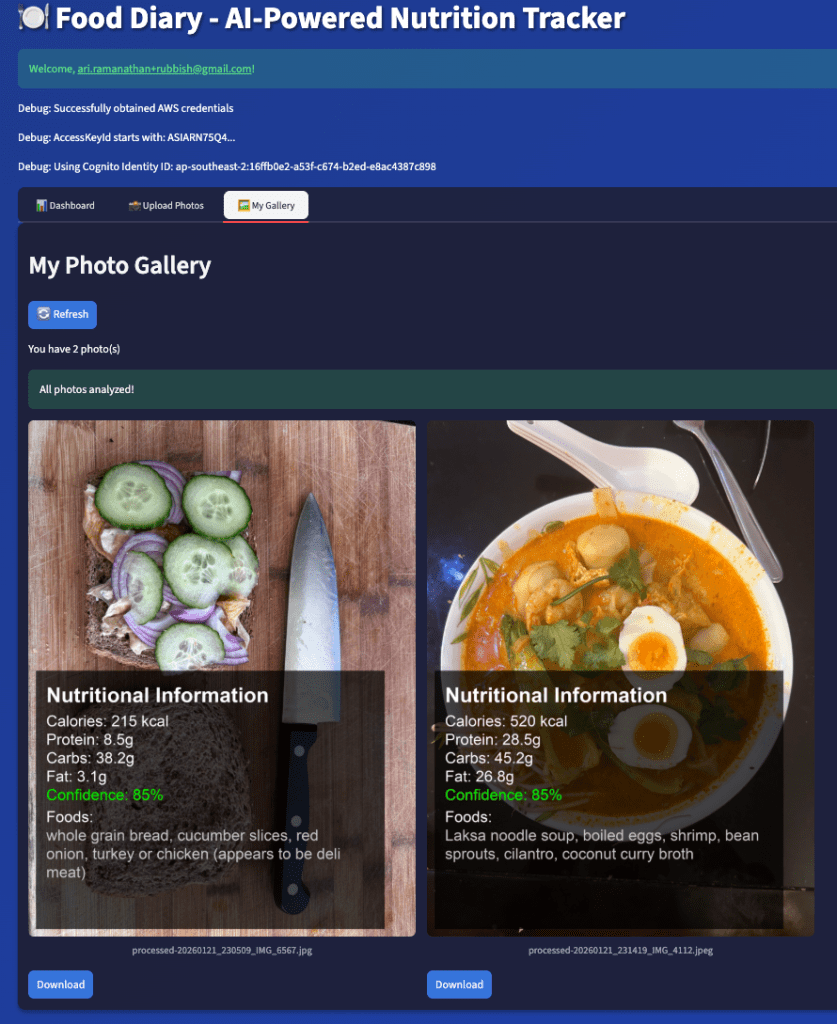
I was totally overwhelmed by the food description accuracy provided by the Claude Sonnet model!
Click on the dashboard tab to get aggregated nutrition data for a day/week.
Solution Overview
Now that we deployed the infrastructure and had a chance to see what can be produced, what is happening in the background? The main work is being done via the lambda function. A summary of the process is:
- A user uploads an image via the Streamlit app into a S3 bucket.
- The S3 bucket has an event notification that triggers the main Lambda function if the file extension is either jpeg or jpg.
- The Lambda function downloads the image from the S3 bucket.
- It converts the image into bytes and resizes it to be less than 4.5Mb (Bedrock image size limit 5Mb, but we leave a bit of overhead for base64 encoding).
- Sends an API request to Claude using a structured JSON prompt.
- Claude returns nutrition data: calories, protein, carbs, fat, confidence score, food items and any notes.
- The original image is overlaid with the nutrition data is stored into a new processed image S3 bucket.
- The response from Claude is stored in a DynamoDB table which allows the dashboard to calculate aggregated results (24 hours and weekly).
The prompt to Claude follows the format below:
prompt = """Analyse the food in this image and provide detailed nutritional information.

Return ONLY a valid JSON object with this exact structure (no additional text):
{
    "calories": <total calories as integer>,
    "protein": <protein in grams as float>,
    "carbs": <carbohydrates in grams as float>,
    "fat": <fat in grams as float>,
    "confidence": <confidence score 0.0-1.0>,
    "food_items": [<list of identified food items>],
    "notes": "<any relevant notes about portion sizes or assumptions>"
}

If you cannot identify food or are uncertain, return low confidence (< 0.5) and estimate conservatively."""
Hopefully, you found this blog series interesting, and it has given you inspiration to build your own application on AWS. I haven’t verified whether the nutrition data returned from Bedrock Claude is accurate, but the text notes seem fairly accurate. The Full details of Python code for the Lambda function can be found my GitHub repository (https://github.com/arinzl/aws-food-diary-part2).
I have taken up a new role in an organisation where they have a preference to use CDK for AWS code deployment. There may be less Terraform content and more CDK content in the future. CDK is an AWS accelerator; it can translate your favourite programming language into CloudFormation and manage the deployment of AWS resources. It is better suited for more complex deployments, which my blogs are trending towards.
 AWS Cloud DevOps