

This blog is a continuation of the AWS Fargate 101 blog post (https://devbuildit.com/2024/08/13/aws-fargate-101/). We will install computer vision software onto an AWS Fargate ECS image to run our computer vision detection and video annotation tools. This blog will help you deploy a system where you can upload a video to an AWS S3 bucket prefix. The uploaded video will be analyzed using YOLO (You Only Look Once) and other computer vision tools. The objects within the video will be detected and annotated into a new video file. The annotated video file will be uploaded to the same input AWS S3 bucket with a new prefix. An example of the input and output videos is shown below:
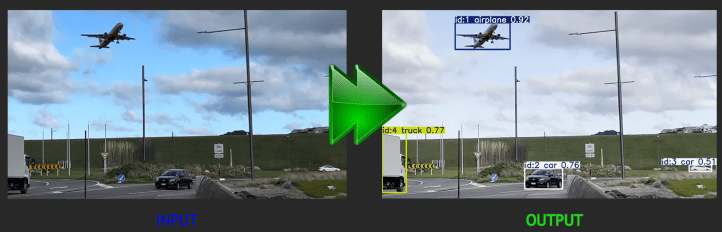
As shown above, the model is able to detect: an aeroplane, a truck and several cars in the video and annotate them with bounding boxes and confidence levels.
Below is a view of the overall process:
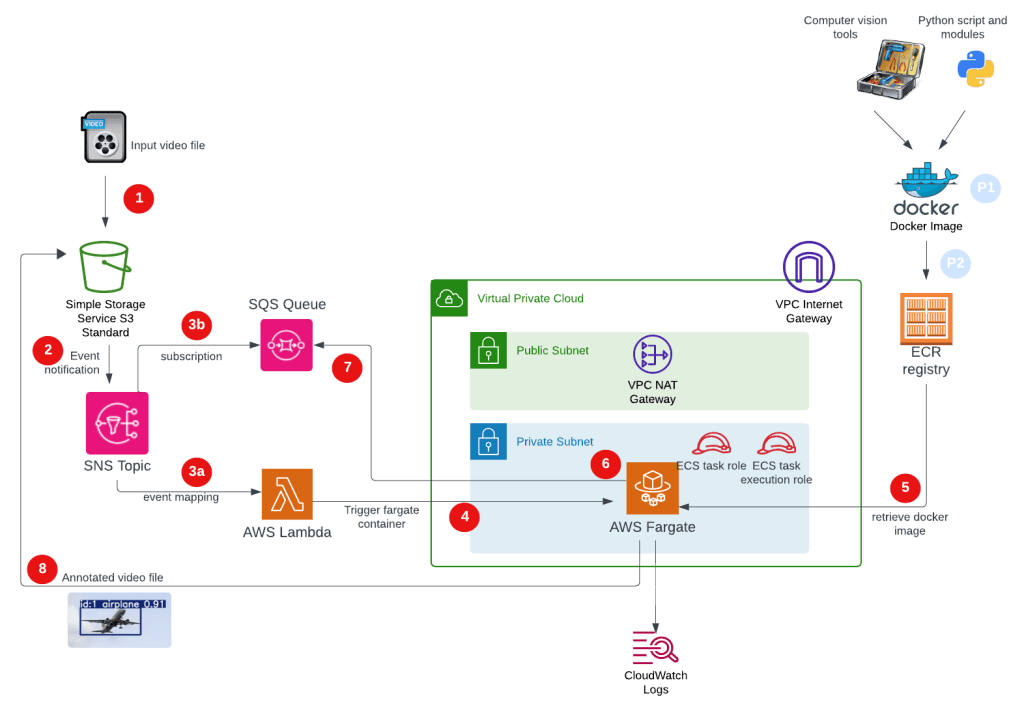
Pre-Steps (blue dots):
P1: Create Docker image. Note the resulting Docker file is large due to loading the Ultranalytics computer vision tool and dependencies.
P2: The Docker image is uploaded to our Amazon ECR.
Video Processing (red dots):
1 – The user will upload a video file using S3 prefix ‘video-in/’.
2 – An S3 event notification is created and sent to an AWS SNS Topic where it undergoes a ‘fan out’ process to 3a & 3b.
3a – An SQS queue message is generated based on the SNS topic subscription.
3b – A Lambda Event Mapping process will start the AWS Lambda function.
4 – The AWS Lamba function will start an ECS Fargate task.
5 – The ECS Fargate instance pulls down the Docker image created in the pre-steps.
6 – The ECS Fargate entry point (Python script) is started.
7 – The Python script reads the SQS queue which contains details of the file uploaded.
8 – The same Python script downloads the video file, runs the computer vision tools and annotates a new video. The annotated video is uploaded back into the same AWS S3 bucket.
Note. The image the AWS Fargate container uses is a whopping 6-7 GB, so the ECS takes a while to initiate and start the computer vision tools.
The Terraform code to deploy the infrastructure for the video processing solution above can be found on my Github repository (https://github.com/arinzl/aws-computer-vision-1). There are two sections: AWS infrastructure and Docker image build. Both are located in subfolders in the repository.
To get the environment up and running you will need to do the following:
- Deploy Terraform code in the TF subfolder
- In the S3 bucket create a folder called ‘video-in’
- Build a local Docker image
- Upload your Docker image to AWS ECR created in the previous step
- Upload video (MP4 format) into the S3 bucket folder ‘video-in’
After 5-10 minutes, another folder called ‘video-processed/‘ is automatically created in your S3 bucket with a new MP4 video file with your annotations.
Deployment file details
AWS Infrastructure: these files are located in the TF subfolder
cloudwatch.tf – AWS cloudwatch log groups for ECS task and cluster.
resource "aws_cloudwatch_log_group" "ecs_cluster" {
  name = "${var.name}-ecs-cluster"

  retention_in_days = 7
}

resource "aws_cloudwatch_log_group" "ecs_task" {
  name = "${var.name}-ecs-task"

  retention_in_days = 7
}
data.tf – data object to enumerate AWS account ID.
data "aws_caller_identity" "current" {}
ecr.tf – AWS ECR to host Docker images (create later).
resource "aws_ecr_repository" "demo" {
  name = "${var.name}-basic"

  image_scanning_configuration {
    scan_on_push = true
  }
}

resource "aws_ecr_registry_scanning_configuration" "configuration" {
  scan_type = "ENHANCED" # inspector enabled on the org level

  rule {
    scan_frequency = "CONTINUOUS_SCAN"
    repository_filter {
      filter      = "*"
      filter_type = "WILDCARD"
    }
  }
}
ecs.tf – AWS cluster and task definitions.
resource "aws_ecs_cluster" "main" {
  name = "${var.name}-cluster"

  configuration {
    execute_command_configuration {
      logging = "OVERRIDE"
      log_configuration {
        cloud_watch_encryption_enabled = false
        cloud_watch_log_group_name     = aws_cloudwatch_log_group.ecs_cluster.name
      }
    }
  }
}

resource "aws_ecs_task_definition" "main" {
  family                   = "${var.name}-ecs-family"
  task_role_arn            = aws_iam_role.ecs_task_role.arn
  execution_role_arn       = aws_iam_role.ecs_task_execution_role.arn
  network_mode             = "awsvpc"
  cpu                      = var.container_cpu
  memory                   = var.container_memory
  requires_compatibilities = ["FARGATE"]
  runtime_platform {
    operating_system_family = "LINUX"
    # cpu_architecture        = "ARM64"
  }

  container_definitions = jsonencode([
    {
      name      = "${var.name}-container"
      image     = "${aws_ecr_repository.demo.repository_url}:latest"
      essential = true
      environment = [
        {
          "name" : "TZ",
          "value" : "Pacific/Auckland"
        },
        {
          "name" : "SQS_QUEUE_URL",
          "value" : aws_sqs_queue.s3_upload.url
        },
      ],
      cpu    = var.container_cpu
      memory = var.container_memory
      portMappings = [
        {
          protocol      = "tcp"
          containerPort = var.container_port
          hostPort      = var.container_port
        }
      ]
      mountPoints = []
      volumesFrom = []
      "linuxParameters" : {
        "initProcessEnabled" : true
      }
      logConfiguration = {
        "logDriver" = "awslogs"
        "options" = {
          "awslogs-group"         = aws_cloudwatch_log_group.ecs_task.name,
          "awslogs-stream-prefix" = "ecs",
          "awslogs-region"        = var.region
        }
      }

    }
  ])
}
iam.tf – IAM roles for ECS Task role, ECS Task Execution role and Lambda role permissions.
## Common ##
data "aws_iam_policy_document" "ecs_task_execution_role_assume_policy" {
  statement {
    actions = [
      "sts:AssumeRole"
    ]
    principals {
      type = "Service"
      identifiers = [
        "ecs-tasks.amazonaws.com"
      ]
    }
  }
}

## ECS Task Execution Role ##
resource "aws_iam_role" "ecs_task_execution_role" {
  name = "${var.name}-ecsTaskExecutionRole"
  managed_policy_arns = [
    "arn:aws:iam::aws:policy/service-role/AmazonECSTaskExecutionRolePolicy",
    "arn:aws:iam::aws:policy/AmazonEC2ContainerRegistryReadOnly"
  ]
  assume_role_policy = data.aws_iam_policy_document.ecs_task_execution_role_assume_policy.json
}

resource "aws_iam_role_policy" "ecs_task_execution_policy" {
  name = "${var.name}-ecs-task-execution"
  role = aws_iam_role.ecs_task_execution_role.id

  policy = data.aws_iam_policy_document.ecs_task_execution_policy_document.json
}

data "aws_iam_policy_document" "ecs_task_execution_policy_document" {

  statement {
    sid = "Logs"

    actions = [
      "logs:CreateLogStream",
      "logs:PutLogEvents"
    ]

    resources = [
      "*"
    ]
  }
  statement {
    sid = "EcrContents"

    actions = [
      "ecr:GetAuthorizationToken",
      "ecr:BatchCheckLayerAvailability",
      "ecr:GetDownloadUrlForLayer",
      "ecr:BatchGetImage"
    ]

    resources = [
      "*"
    ]
  }

}

## ECS Task Role ##
resource "aws_iam_role" "ecs_task_role" {
  name = "${var.name}-ecsTaskRole"

  assume_role_policy = data.aws_iam_policy_document.ecs_task_execution_role_assume_policy.json
}


resource "aws_iam_role_policy" "ecs_task_policy" {
  name = "${var.name}-ecs-task"
  role = aws_iam_role.ecs_task_role.id

  policy = data.aws_iam_policy_document.ecs_task_policy_document.json
}

data "aws_iam_policy_document" "ecs_task_policy_document" {

  statement {
    sid = "Logs"

    actions = [
      "logs:CreateLogStream",
      "logs:PutLogEvents"
    ]

    resources = [
      "*"
    ]
  }

  statement {
    sid = "ECSPermissions"

    actions = [
      "ecs:ExecuteCommand",
      "ecs:DescribeTasks"
    ]

    resources = [
      "*"
    ]
  }

  statement {
    sid = "AWSCLIECSExec"

    actions = [
      "ssmmessages:CreateControlChannel",
      "ssmmessages:CreateDataChannel",
      "ssmmessages:OpenControlChannel",
      "ssmmessages:OpenDataChannel"
    ]

    resources = [
      "*"
    ]
  }

  statement {
    sid = "sqs"

    actions = [
      "sqs:SendMessage",
      "sqs:DeleteMessage",
      "sqs:ChangeMessageVisibility",
      "sqs:ReceiveMessage",
      "sqs:GetQueueUrl"
    ]

    resources = [
      aws_sqs_queue.s3_upload.arn
    ]
  }

  statement {
    sid = "s3"

    actions = [
      "s3:GetObject",
      "s3:PutObject",
      "s3:DeleteObject"
    ]

    resources = [
      aws_s3_bucket.example.arn,
      "${aws_s3_bucket.example.arn}/*"
    ]
  }

}

##---------Lambda------------##
resource "aws_iam_role" "lambda" {
  name = "${var.lambda_name}-lambda-role"

  assume_role_policy = <<-EOF
    {
        "Version": "2012-10-17",
        "Statement": [
            {
                "Principal": {
                    "Service": "lambda.amazonaws.com"
                },
                "Action": "sts:AssumeRole",
                "Effect": "Allow"
            }
        ]
    }
    EOF
}

resource "aws_iam_role_policy" "lambda_role_policy" {
  name = "${var.lambda_name}-lambda-policy"
  role = aws_iam_role.lambda.id

  policy = <<-EOF
    {
      "Version": "2012-10-17",
      "Statement": [
          {
              "Sid": "LambdaCloudwatchGroup",
              "Effect": "Allow",
              "Action": "logs:CreateLogGroup",
              "Resource": "arn:aws:logs:*:${data.aws_caller_identity.current.account_id}:*"
          },
          {
              "Sid": "LambdaCloudwatchLogging",
              "Effect": "Allow",
              "Action": [
                  "logs:CreateLogStream",
                  "logs:PutLogEvents"
              ],
              "Resource": "arn:aws:logs:*:${data.aws_caller_identity.current.account_id}:log-group:/aws/lambda/${var.lambda_name}:*"
          },
          {
              "Sid": "LambdaSQS",
              "Effect": "Allow",
              "Action": "sqs:getqueueattributes",
              "Resource": "*"
          },
          {
              "Sid": "LambdaECS",
              "Effect": "Allow",
              "Action": "ecs:RunTask",
              "Resource": "*"
          },
          {
              "Sid": "LambdaIamPass",
              "Effect": "Allow",
              "Action": "iam:PassRole",
              "Resource": "*"
          },
          {
            "Sid": "LambdaSNS",
             "Effect": "Allow",
            "Action": [
              "sns:Publish",
              "sns:Subscribe"
            ],
            "Resource": ["${aws_sns_topic.s3_upload.arn}"]
          }
      ]
    }
    EOF
}
lambda.tf – create a Lambda trigger function from the code in the Lambda subfolder
resource "aws_lambda_function" "myapp_lambda_function" {
  filename      = "${path.module}/lambda_out/${var.lambda_name}.zip"
  function_name = var.lambda_name
  role          = aws_iam_role.lambda.arn
  handler       = "${var.lambda_name}.lambda_handler"
  runtime       = "python3.10"


  environment {
    variables = {
      ECS_CLUSTER_NAME    = aws_ecs_cluster.main.name
      ECS_TASK_DEFINITION = aws_ecs_task_definition.main.id
      SQS_QUEUE_URL       = aws_sqs_queue.s3_upload.url
      SECURITY_GROUP_ID   = aws_security_group.ecs_task.id
      ECS_SUBNET_ID       = join(",", module.demo_ecs_vpc.private_subnets)
      SNS_TOPIC           = aws_sns_topic.s3_upload.arn
    }
  }
}

resource "aws_lambda_permission" "allow_sns" {
  statement_id  = "AllowExecutionFromSNS"
  action        = "lambda:InvokeFunction"
  function_name = aws_lambda_function.myapp_lambda_function.function_name
  principal     = "sns.amazonaws.com"
  source_arn    = aws_sns_topic.s3_upload.arn
}

#create zip file
data "archive_file" "zip_python_code" {
  type        = "zip"
  source_dir  = "${path.module}/lambda/"
  output_path = "${path.module}/lambda_out/${var.lambda_name}.zip"
}
/lambda/trigger_fargate.py – Lambda Python code to trigger ECS task.
import json
import boto3
import os

ecs_client = boto3.client('ecs')
sqs_client = boto3.client('sqs')

CLUSTER_NAME = os.getenv('ECS_CLUSTER_NAME')
TASK_DEFINITION = os.getenv('ECS_TASK_DEFINITION')
SUBNET_ID = os.getenv('ECS_SUBNET_ID')
SECURITY_GROUP_ID = os.getenv('SECURITY_GROUP_ID')

print(f"cluster name read from os: {CLUSTER_NAME}")
print(f"TASK_DEFINITION read from os: {TASK_DEFINITION}")
print(f"SUBNET_ID read from os: {SUBNET_ID}")
print(f"SECURITY_GROUP_ID read from os: {SECURITY_GROUP_ID}")


def lambda_handler(event, context):
    # Get the number of messages in the SQS queue
    queue_url = os.getenv('SQS_QUEUE_URL')
    response = sqs_client.get_queue_attributes(
        QueueUrl=queue_url,
        AttributeNames=['ApproximateNumberOfMessages']
    )

    message_count = int(response['Attributes']['ApproximateNumberOfMessages'])

    if message_count > 0:
        # Define the number of tasks to start based on the message count
        num_tasks = message_count // 10 + 1 # Example: 1 task per 10 messages

        if num_tasks > 0:
            # Start Fargate tasks
            response = ecs_client.run_task(
                cluster=CLUSTER_NAME,
                taskDefinition=TASK_DEFINITION,
                count=num_tasks,
                launchType='FARGATE',
                networkConfiguration={
                    'awsvpcConfiguration': {
                        'subnets': [SUBNET_ID],
                        'securityGroups': [SECURITY_GROUP_ID]
                    }
                }
            )

            return {
                'statusCode': 200,
                'body': json.dumps('Started {} tasks'.format(num_tasks))
            }
        else:
            return {
                'statusCode': 200,
                'body': json.dumps('No tasks started')
            }
            print("No SQS messages in queue")
    else:
            return {
                'statusCode': 200,
                'body': json.dumps('No Messages found')
            }
provider.tf – Terraform provider file.
provider "aws" {
  region = var.region


  default_tags {
    tags = {
      deployedBy     = "Terraform"
      terraformStack = "mycode"
    }
  }
}
s3.tf – S3 bucket and event notification
resource "aws_s3_bucket" "example" {
  bucket = "computer-vision-${data.aws_caller_identity.current.account_id}"
}

resource "aws_s3_bucket_notification" "bucket_notification" {
  bucket = aws_s3_bucket.example.id

  topic {
    topic_arn = aws_sns_topic.s3_upload.arn
    events    = ["s3:ObjectCreated:*"]

    filter_prefix = "video-in/"
    filter_suffix = ".mp4"
  }
}
security-groups.tf – security group for ECS tasks
resource "aws_security_group" "ecs_task" {
  description = "Managed by Terraform"
  name        = "${var.name}-sg-task"
  vpc_id      = module.demo_ecs_vpc.vpc_id

  ingress {
    description = "Allow from private subnets"
    protocol    = "tcp"
    from_port   = var.container_port
    to_port     = var.container_port
    cidr_blocks = ["0.0.0.0/0"]
  }

  egress {
    description = "Allow to all internal destinations"
    protocol    = "-1"
    from_port   = 0
    to_port     = 0
    cidr_blocks = ["0.0.0.0/0"]
  }
}
sns.tf – AWS SNS for video upload and SNS topic subscriptions
resource "aws_sns_topic" "s3_upload" {
  name = "${var.name}-sns"
}

resource "aws_sns_topic_policy" "s3_upload" {
  arn = aws_sns_topic.s3_upload.arn

  policy = data.aws_iam_policy_document.s3_upload_topic.json
}

data "aws_iam_policy_document" "s3_upload_topic" {
  statement {
    sid    = "s3uploadnotification"
    effect = "Allow"
    principals {
      type        = "Service"
      identifiers = ["s3.amazonaws.com"]
    }
    actions = [
      "SNS:Publish"
    ]
    resources = [
      aws_sns_topic.s3_upload.arn
    ]
  }
}

resource "aws_sns_topic_subscription" "sns_to_sqs" {
  topic_arn = aws_sns_topic.s3_upload.arn
  protocol  = "sqs"
  endpoint  = aws_sqs_queue.s3_upload.arn
}

resource "aws_sns_topic_subscription" "sns_to_lambda" {
  topic_arn = aws_sns_topic.s3_upload.arn
  protocol  = "lambda"
  endpoint  = aws_lambda_function.myapp_lambda_function.arn
}
sqs.tf – AWS SQS queue for upload notification
resource "aws_sqs_queue" "s3_upload" {
  name       = "${var.name}-sqs"
  fifo_queue = false
}

resource "aws_sqs_queue_policy" "s3_upload" {
  queue_url = aws_sqs_queue.s3_upload.url
  policy    = data.aws_iam_policy_document.s3_upload_queue.json
}

data "aws_iam_policy_document" "s3_upload_queue" {
  statement {
    sid    = "myaccountsqs"
    effect = "Allow"
    principals {
      type        = "AWS"
      identifiers = ["arn:aws:iam::${data.aws_caller_identity.current.account_id}:root"]
    }
    actions = [
      "sqs:*"
    ]
    resources = [
      aws_sqs_queue.s3_upload.arn
    ]
  }

  statement {
    sid    = "Allow-SNS-SendMessage"
    effect = "Allow"
    principals {
      type        = "AWS"
      identifiers = ["*"]
    }
    actions = [
      "sqs:SendMessage"
    ]
    resources = [
      aws_sqs_queue.s3_upload.arn
    ]
    condition {
      test     = "ArnEquals"
      variable = "aws:SourceArn"
      values   = [aws_sns_topic.s3_upload.arn]
    }
  }
}
terraform.tfvar.tf – Terraform variable initial values (region and ECS networking).
region               = "ap-southeast-2"
vpc_cidr_range       = "172.17.0.0/20"
private_subnets_list = ["172.17.0.0/24"]
public_subnets_list  = ["172.17.3.0/24"]
variable.tf – Terraform code variables.
variable "region" {
  description = "AWS Region"
  type        = string
}

variable "name" {
  description = "the name of your stack"
  type        = string
  default     = "computervision"
}

variable "lambda_name" {
  description = "the Lambda function name"
  type        = string
  default     = "trigger_fargate"
}


variable "container_port" {
  description = "Port of container"
  type        = number
  default     = 3000
}

variable "container_cpu" {
  description = "The number of cpu units used by the task"
  type        = number
  default     = 1024
}

variable "container_memory" {
  description = "The amount (in MiB) of memory used by the task"
  type        = number
  default     = 2048
}

variable "service_desired_count" {
  description = "Minimum number of services running in parallel"
  type        = string
  default     = 1
}

variable "vpc_cidr_range" {
  type = string
}

variable "private_subnets_list" {
  description = "Private subnet list for infrastructure"
  type        = list(string)
}

variable "public_subnets_list" {
  description = "Public subnet list for infrastructure"
  type        = list(string)
}

variable "app_port" {
  description = "Port exposed by the docker image to redirect traffic to (not required for operation)"
  default     = 3000
}

variable "fargate_cpu" {
  description = "Fargate instance CPU units to provision (1 vCPU = 1024 CPU units)"
  default     = "1024"
}

variable "fargate_memory" {
  description = "Fargate instance memory to provision (in MiB)"
  default     = "2048"
}
vpc.tf – AWS VPC and network dependencies for ECS task.
#------------------------------------------------------------------------------
# VPC Module
#------------------------------------------------------------------------------
module "demo_ecs_vpc" {
  source  = "terraform-aws-modules/vpc/aws"
  version = "5.8.1"

  name = "${var.name}-vpc"
  cidr = var.vpc_cidr_range

  azs             = ["${var.region}a"]
  private_subnets = var.private_subnets_list
  public_subnets  = var.public_subnets_list

  enable_flow_log                      = true
  create_flow_log_cloudwatch_log_group = true
  create_flow_log_cloudwatch_iam_role  = true
  flow_log_max_aggregation_interval    = 60

  create_igw         = true
  enable_nat_gateway = true
  enable_ipv6        = false

  enable_dns_hostnames = true
  enable_dns_support   = true
}
ECR Docker image: these files are located in the Docker subfolder.
docker.sh – Bash script to create local Docker image and upload to AWS ECR.
#!/bin/bash

# Exit immediately if a command exits with a non-zero status
set -e

# Set variables
AWS_REGION="ap-southeast-2"
ACCOUNT_ID=$(aws sts get-caller-identity --query Account --output text)
REPOSITORY_NAME="computervision-basic"
IMAGE_NAME="image-processor"

#get files for dockerbuild

aws s3 cp s3://video-processing-484673417484/docker/yolov8n.pt .
aws s3 cp s3://video-processing-484673417484/docker/processvideo.py .
aws s3 cp s3://video-processing-484673417484/docker/Dockerfile .

# Authenticate Docker with ECR
aws ecr get-login-password --region $AWS_REGION | docker login --username AWS --password-stdin $ACCOUNT_ID.dkr.ecr.$AWS_REGION.amazonaws.com

# Build Docker image
docker build -t $IMAGE_NAME .

# Tag Docker image
docker tag $IMAGE_NAME:latest $ACCOUNT_ID.dkr.ecr.$AWS_REGION.amazonaws.com/$REPOSITORY_NAME:latest

# Push Docker image to ECR
docker push $ACCOUNT_ID.dkr.ecr.$AWS_REGION.amazonaws.com/$REPOSITORY_NAME:latest

echo "Docker image successfully pushed to ECR $ACCOUNT_ID.dkr.ecr.$AWS_REGION.amazonaws.com/$REPOSITORY_NAME:latest"
Dockerfile – Build Docker image from Ubuntu 22 base, set Python version to 3.10, load computer vision tools, copy processing Python script and YOLO weight file to Docker image.
FROM ubuntu:22.04

# Set environment variables
ENV DEBIAN_FRONTEND=noninteractive
ENV TZ=Pacific/Auckland

# Install dependencies
RUN apt-get update && \
    apt-get install -y software-properties-common && \
    add-apt-repository ppa:deadsnakes/ppa && \
    apt-get update && \
    apt-get install -y python3.10 python3.10-distutils python3.10-dev wget ffmpeg libsm6 libxext6

# Set Python 3.10 as the default python3
RUN update-alternatives --install /usr/bin/python3 python3 /usr/bin/python3.10 1

# Install pip for Python 3.10
RUN wget https://bootstrap.pypa.io/get-pip.py && python3 get-pip.py && rm get-pip.py

# Install AWS CLI, Boto3, and OpenCV
RUN pip install boto3 opencv-python numpy ultralytics

# Set the working directory
WORKDIR /app

# Copy the Python script and yolo weights into container
COPY yolov8n.pt .
COPY processvideo.py .

# Run the Python script
CMD ["python3", "processvideo.py"]
process.py – Python script to process video files
import boto3
import json
import cv2
import numpy as np
import os
import logging
from ultralytics import YOLO
from datetime import datetime

def process_video(queue_url):
    try:
        response = sqs.receive_message(
            QueueUrl=queue_url,
            MaxNumberOfMessages=1,
            WaitTimeSeconds=10
        )
        # Check if 'Messages' key exists in the response
        if 'Messages' in response:
            for message in response['Messages']:
                # Parse SQS message body
                body = json.loads(message['Body'])

                sns_message_str = json.loads(body["Message"])
                print(type(sns_message_str))

                # S3 event notifications are in the 'Records' list
                if 'Records' in sns_message_str:
                    print(f"4-Records found of type {type(sns_message_str)}")
                    for record in sns_message_str['Records']:
                        print(record)
                        if record['eventSource'] == 'aws:s3':
                            bucket_name = record['s3']['bucket']['name']
                            object_key = record['s3']['object']['key']
                            logging.info(f"Bucket: {bucket_name}, Object Key: {object_key}")
                            print(f"6-Bucket: {bucket_name}, Object Key: {object_key}")

                            # Split object key into folder and file
                            folder, file_name = os.path.split(object_key)

                            # Download the object
                            download_path = f'/app/{file_name}'
                            s3.download_file(bucket_name, object_key, download_path)
                            logging.info(f"Downloaded {object_key} to {download_path}")
                            print(f"7-Downloaded {object_key} to {download_path}")

                            # process video file
                            cap = cv2.VideoCapture(download_path)
                            frame_width = int(cap.get(cv2.CAP_PROP_FRAME_WIDTH))
                            frame_height = int(cap.get(cv2.CAP_PROP_FRAME_HEIGHT))
                            size = (frame_width,frame_height)
                            fps = cap.get(cv2.CAP_PROP_FPS)
                            fourcc = cv2.VideoWriter_fourcc(*'mp4v')
                            out = cv2.VideoWriter('output.mp4', fourcc, fps, size )
                            timestamp = datetime.now().strftime('%Y%m%d_%H%M%S')
                            s3_uploadkey = f'video-processed/{timestamp}_{file_name}'

                            while cap.isOpened():
                                ret, frame = cap.read()
                                if not ret:
                                    break

                                results = model.track(frame, persist=True)
                                mod_frame = results[0].plot()
                                out.write(mod_frame)

                            cap.release()
                            out.release()
                            cv2.destroyAllWindows()
                            print("9-Video processing completed, next upload")

                            # Upload the process video to the new folder 'video-processed'

                            s3.upload_file('output.mp4', bucket_name, s3_uploadkey)
                            logging.info(f"Uploaded converted video to {s3_uploadkey}")
                            print(f"10-Uploaded converted video to {s3_uploadkey}")

                            # Clean up the downloaded file
                            os.remove(download_path)
                            os.remove('output.mp4')
                            logging.info(f"Removed downloaded file {download_path}")


                # Delete the message from the queue to prevent reprocessing
                sqs.delete_message(
                    QueueUrl=queue_url,
                    ReceiptHandle=message['ReceiptHandle']
                )

                logging.info("Deleted message from queue.")
                print("11-Deleted message from queue.")

        else:
            logging.info("12-No messages received.")

    except Exception as e:
        logging.error(f"An error occurred: {e}")
        print(f"An error occurred: {e}")


# Enable logging
logging.basicConfig(
    filename='/app/vidoprocessing.log',
    level=logging.INFO,
    format='%(asctime)s %(levelname)s %(message)s',
    datefmt='%Y-%m-%d %H:%M:%S'
)

queue_url = os.getenv('SQS_QUEUE_URL')


# Load YOLOv8 model
model = YOLO('yolov8n.pt')  # Ensure you have the yolov8s.pt file

sqs = boto3.client('sqs')
s3 = boto3.client('s3')
logging.info("Starting SQS listener...")


if not queue_url:
    print("1-SQS_QUEUE_URL environment variable not set")
    logging.error("SQS_QUEUE_URL environment variable not set")

    exit(1)
else:
    print(f"1-Polling SQS queue: {queue_url}")
    logging.info("Processing queue events")
    print("2-Processing queue events")

    process_video(queue_url)
Once you have completed the steps above and uploaded your video (mp4 format only) for processing, a resulting output video will be created in your s3 bucket. I have left a short sample video in the Github repository with a video input and expected output. The output video also demonstrates the object tracking feature available in the YOLO model.
Hopefully this blog has given you some insights on how you can conduct your own computer vision projects on AWS using serverless technologies. It can be tricky to create the environment for the Python script to run with the various module dependencies and required versions. In future blogs I will aim to incorporate more AWS services to make the process easier.
 AWS Cloud DevOps
[…] the previous blog posts on AWS Fargate (https://devbuildit.com/2024/08/13/aws-fargate-101/) and Computer Vision (https://devbuildit.com/2024/09/15/computer-vision-intro/) for background […]
LikeLike