
In my previous blog posts, I demonstrated how to orchestrate AWS infrastructure using Terraform. In this post, I take a slightly different approach by setting up basic orchestration of AWS resources using GitHub and the AWS Cloud Development Kit (CDK) (see https://docs.aws.amazon.com/cdk/v2/guide/home.html).
GitHub (www.github.com) is the world’s largest cloud-based developer platform and Git hosting service. It allows developers to host code in repositories and automate workflows through GitHub Actions. These actions can securely execute code in your AWS environment using OpenID Connect (OIDC), an interoperable authentication protocol built on top of the OAuth 2.0 framework.
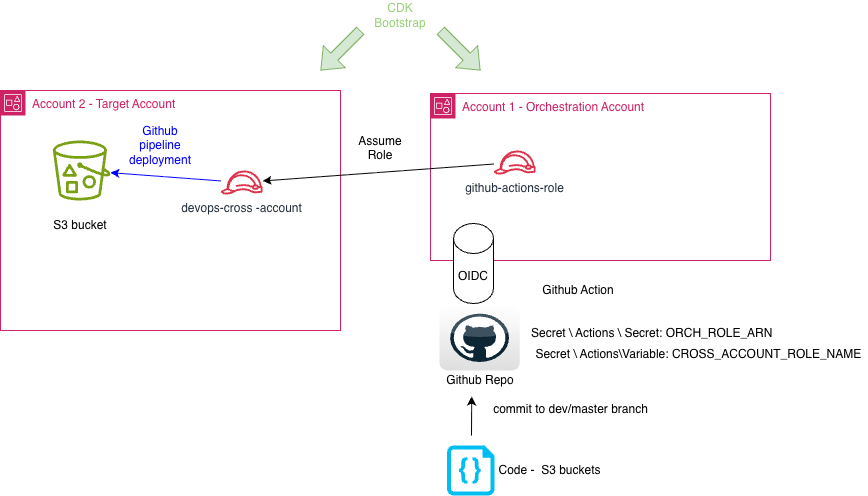
GitHub Actions runners can then deploy and manage AWS resources using CDK. Before using CDK, each AWS account and region must be bootstrapped to enable CDK deployments. The high-level architecture of this orchestration setup is shown below. Note that in this example, a dedicated AWS account is used for orchestration—while not strictly required, this is considered a best practice.
AWS Steps
For CDK usage, it is necessary to bootstrap both accounts via the command:
cdk bootstrap aws://<aws accountid>:<aws region>
Repeat the step for each “account:region” mapping in the target accounts.
CDK bootstrapping will create the following resources in your account and region
- S3 bucket
- IAM Role
- SSM Parameter
- ECR repo
Any code used in the remaining parts of this blog post can be found here (#TBC)
Our next step is to deploy some prerequisite components for the orchestration account:
- GitHub OIDC
- IAM Role for GitHub runner to assume
These resources can be deployed via the Cloudformation template within the prerequisites/orchestration-account folder. The default provider name is github-oidc and the default role name in the orchestration account is orch-github-oidc-role. You will also need to provide:
- GitHub Org
- GitHub Repository
- AWS AccountID(s) of all target account(s) you wish to deploy to.
The cloudformation template can be deployed using the command:
aws cloudformation deploy \ --template-file github-oidc.yaml \ --stack-name orchestration-control-stack \ --parameter-overrides \ GitHubOrg="<your-github-org>" \ GitHubRepo="<your-repo-name>" \ TargetAccountIDs="<target account ID>" \ --capabilities CAPABILITY_NAMED_IAM \ --region <your-aws-region>
You can override the default provider name via the parameter-overrides switch “OIDCProviderName=”my-custom-name”. Note that your GitHub Repo visibility should be set to “Private”. The contents of file github-oidc.yaml is shown below:
AWSTemplateFormatVersion: '2010-09-09'Description: > Creates the devops-cross-account IAM role assumed by the GitHub Actions orchestration role in the hub account.Parameters: TrustedAccountID: Type: String Description: > AWS account ID of the orchestration account that holds the role permitted to assume this role (e.g. 123456789012). AllowedPattern: '^\d{12}$' ConstraintDescription: Must be a 12-digit AWS account ID. TrustedRoleName: Type: String Default: orch-github-oidc-role Description: > Name of the role in the orchestration account to trust. Must match the role name deployed by github-oidc.yml.Resources: DevOpsCrossAccountRole: Type: AWS::IAM::Role Properties: RoleName: devops-cross-account Tags: - Key: GithubRepo Value: "my-org/my-repo" Description: >- Assumed by the GitHub Actions orchestration role to perform deployments in this account. AssumeRolePolicyDocument: Version: '2012-10-17' Statement: - Sid: AllowOrchestrationRoleUsageForDeployments Effect: Allow Principal: AWS: !Sub arn:aws:iam::${TrustedAccountID}:role/${TrustedRoleName} Action: sts:AssumeRole ManagedPolicyArns: - arn:aws:iam::aws:policy/AdministratorAccess Tags: - Key: ManagedBy Value: cloudformation - Key: TrustedAccount Value: !Ref TrustedAccountIDOutputs: RoleArn: Description: ARN of the devops-cross-account role. Value: !GetAtt DevOpsCrossAccountRole.Arn
Each target account will need a role for the orchestration account role to assume. This can be deployed using the CloudFormation template in prerequisites/target-account folder using command:
aws cloudformation deploy \ --template-file devops-cross-account.yaml \ --stack-name devops-cross-account-stack \ --parameter-overrides \ TrustedAccountID="<AWS account ID of Orchestration Account>" \ TrustedRoleName="orch-github-oidc-role" \ --capabilities CAPABILITY_NAMED_IAM \ --region <your-aws-region>
The contents of file devops-cross-account.yaml is shown below:
AWSTemplateFormatVersion: '2010-09-09'Description: > Creates the devops-cross-account IAM role assumed by the GitHub Actions orchestration role in the hub account.Parameters: TrustedAccountID: Type: String Description: > AWS account ID of the orchestration account that holds the role permitted to assume this role (e.g. 123456789012). AllowedPattern: '^\d{12}$' ConstraintDescription: Must be a 12-digit AWS account ID. TrustedRoleName: Type: String Default: orch-github-oidc-role Description: > Name of the role in the orchestration account to trust. Must match the role name deployed by github-oidc.yml.Resources: DevOpsCrossAccountRole: Type: AWS::IAM::Role Properties: RoleName: devops-cross-account Tags: - Key: GithubRepo Value: "my-org/my-repo" Description: >- Assumed by the GitHub Actions orchestration role to perform deployments in this account. AssumeRolePolicyDocument: Version: '2012-10-17' Statement: - Sid: AllowOrchestrationRoleUsageForDeployments Effect: Allow Principal: AWS: !Sub arn:aws:iam::${TrustedAccountID}:role/${TrustedRoleName} Action: sts:AssumeRole ManagedPolicyArns: - arn:aws:iam::aws:policy/AdministratorAccess Tags: - Key: ManagedBy Value: cloudformation - Key: TrustedAccount Value: !Ref TrustedAccountIDOutputs: RoleArn: Description: ARN of the devops-cross-account role. Value: !GetAtt DevOpsCrossAccountRole.Arn
To summarise the chain so far: The GitHub Actions runner authenticates via OIDC and assumes the orchestionation role, which in turn assumes a role in the target account. The workflow below puts this into practice.
GitHub Steps
In the GitHub Repo you specified in the orchestration-control-stack, create an Actions Secret named ORCH_ROLE_ARN and populate it with the ARN of the role created in the Orchestration Account e.g., arn:aws:iam::<your aws orchestration account ID>:role/orch-github-oidc-role.
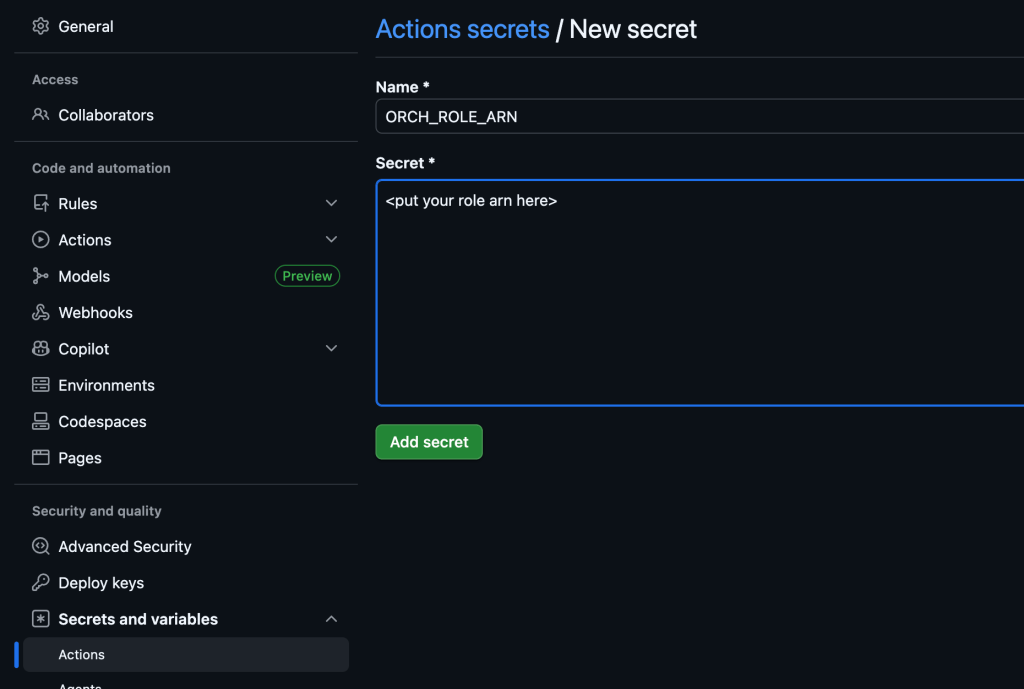
Similarly create an Actions Variable called CROSS_ACCOUNT_ROLE_NAME and set it to the “devops-cross-account” (to match the role name in the target account).
The next step is to set up a GitHub workflow (think of this as a series of automated steps) using GitHub Actions (the platform that runs these workflows). GitHub Actions and workflows are used to automate tasks in a repository, such as building, testing, and deploying code to AWS. A workflow is defined in a YAML file stored in the .github/workflows directory and consists of a series of jobs triggered by events like code pushes or pull requests. Each job runs on a virtual machine and contains steps, which can execute shell commands. The GitHub workflow hierarchy consists of multiple jobs with each job containing multiple steps.
My workflow document in .github/workflows directory is called deployment.yml, the name is not important but the file extension is. The content of file deployment.yml is shown below:
name: Multi Account Deploymenton: push: branches: - dev - main workflow_dispatch:permissions: id-token: write contents: readenv: DEFAULT_REGION: ap-southeast-2jobs: deployment: runs-on: ubuntu-latest steps: - name: Checkout code uses: actions/checkout@v4 - name: Load environment variables id: env run: | if [ -f .env ]; then source .env # Export variables to $GITHUB_OUTPUT so they can be used in subsequent steps. # Variables are only available within their step's scope. To pass data between steps, # we write to $GITHUB_OUTPUT (format: name=value), then reference them as ${{ steps.STEP_ID.outputs.NAME }} echo "bucket_prefix=$bucket_prefix" >> $GITHUB_OUTPUT echo "target_account_id=$target_account_id" >> $GITHUB_OUTPUT echo "Environment variables loaded:" echo "aws_region: ${{ env.DEFAULT_REGION }}" echo "target_account_id: $target_account_id" echo "bucket_prefix: $bucket_prefix" echo "CROSS_ACCOUNT_ROLE_NAME: ${{ vars.CROSS_ACCOUNT_ROLE_NAME }}" else echo "Error: .env file not found" exit 1 fi - name: Configure AWS credentials uses: aws-actions/configure-aws-credentials@v4 with: role-to-assume: ${{ secrets.ORCH_ROLE_ARN }} aws-region: ${{ env.DEFAULT_REGION }} - name: Output Orchestration Account and Role (debugging only) run: | # Get AWS Account ID from current credentials ACCOUNT_ID=$(aws sts get-caller-identity --query Account --output text) # Extract role name from the ARN (format: arn:aws:iam::ACCOUNT_ID:role/ROLE_NAME) ROLE_NAME=$(aws sts get-caller-identity --query Arn --output text | cut -d'/' -f2) echo "AWS Account ID: $ACCOUNT_ID" echo "Assumed Role Name: $ROLE_NAME" - name: Assume Cross-Account Role id: assume-cross-account run: | # Construct the cross-account role ARN CROSS_ACCOUNT_ROLE_ARN="arn:aws:iam::${{ steps.env.outputs.target_account_id }}:role/${{ vars.CROSS_ACCOUNT_ROLE_NAME }}" echo "Assuming cross-account role: $CROSS_ACCOUNT_ROLE_ARN" # Assume the cross-account role and get temporary credentials CREDENTIALS=$(aws sts assume-role \ --role-arn "$CROSS_ACCOUNT_ROLE_ARN" \ --role-session-name "github-actions-session" \ --duration-seconds 3600 \ --query 'Credentials.[AccessKeyId,SecretAccessKey,SessionToken]' \ --output text) # Parse credentials AWS_ACCESS_KEY_ID=$(echo $CREDENTIALS | awk '{print $1}') AWS_SECRET_ACCESS_KEY=$(echo $CREDENTIALS | awk '{print $2}') AWS_SESSION_TOKEN=$(echo $CREDENTIALS | awk '{print $3}') # Export as GitHub outputs (masked for security) for use in subsquent steps in job echo "aws_access_key_id=$AWS_ACCESS_KEY_ID" >> $GITHUB_OUTPUT echo "aws_secret_access_key=$AWS_SECRET_ACCESS_KEY" >> $GITHUB_OUTPUT echo "aws_session_token=$AWS_SESSION_TOKEN" >> $GITHUB_OUTPUT - name: Verify Cross-Account Role (debugging only) run: | CALLER_IDENTITY=$(aws sts get-caller-identity --output json) ACCOUNT_ID=$(echo $CALLER_IDENTITY | jq -r '.Account') ROLE_ARN=$(echo $CALLER_IDENTITY | jq -r '.Arn') ROLE_NAME=$(echo $ROLE_ARN | cut -d'/' -f2) echo "Cross-Account Assumption Verified:" echo "Account ID: $ACCOUNT_ID" echo "Role Name: $ROLE_NAME" echo "Role ARN: $ROLE_ARN" echo "Region: ${{ env.DEFAULT_REGION }}" env: AWS_ACCESS_KEY_ID: ${{ steps.assume-cross-account.outputs.aws_access_key_id }} AWS_SECRET_ACCESS_KEY: ${{ steps.assume-cross-account.outputs.aws_secret_access_key }} AWS_SESSION_TOKEN: ${{ steps.assume-cross-account.outputs.aws_session_token }} AWS_DEFAULT_REGION: ${{ env.DEFAULT_REGION }} - name: Setup Node.js uses: actions/setup-node@v4 with: node-version: "24.0.0" - name: Setup Python uses: actions/setup-python@v5 with: python-version: "3.13" - name: Install dependencies run: | # Install Python dependencies python -m pip install --upgrade pip pip install -r requirements.txt # Install AWS CDK CLI npm install -g aws-cdk - name: Deploy CDK Stack run: | cdk deploy \ --require-approval never env: AWS_ACCESS_KEY_ID: ${{ steps.assume-cross-account.outputs.aws_access_key_id }} AWS_SECRET_ACCESS_KEY: ${{ steps.assume-cross-account.outputs.aws_secret_access_key }} AWS_SESSION_TOKEN: ${{ steps.assume-cross-account.outputs.aws_session_token }} AWS_DEFAULT_REGION: ${{ env.DEFAULT_REGION }} aws_region: ${{ env.DEFAULT_REGION }} target_account_id: ${{ steps.env.outputs.target_account_id }} bucket_prefix: ${{ steps.env.outputs.bucket_prefix }}
This GitHub workflow automates the deployment of infrastructure across AWS accounts using AWS CDK. The key elements are:
- The workflow has a single job with multiple steps.
- The workflow is granted permission to obtain a GitHub OIDC token (line 11) and is granted read permission to the repository contents (line 12).
- Declares a global environment variable DEFAULT_REGION (lines 14-15) which is available to all jobs and steps via
${{ env.DEFAULT_REGION }}
- The workflow is triggered when code is pushed to the dev or main branches, or manually via workflow_dispatch (lines 6 – 8)
- The workflow runs on an Ubuntu virtual machine (lines 18-19)
- Checks out code from the repository into the virtual machine (line 21-22)
- Loads variable from the .env file and creates variables that are readable in subsequent steps (lines 24 – 42)
- Connects to AWS using OIDC and assumes role, the ARN read from the Github secret ORCH_ROLE_ARN (lines 44 – 48)
- Assumes a role in target account and saves credentials as hidden variables (lines 60 – 84)
- Sets up NodeJS (required for cdk) (line 104-107)
- Sets up Python (line 109-112)
- Install Python dependencies and installs CDK (line 114-121)
- Deployment step (Deploy CDK Stack, lines 123-134). Set 7 OS environment variables during this step
- Four Authentication OS variables:
- AWS_ACCESS_KEY_ID
- AWS_SECRET_ACCESS_KEY
- AWS_SESSION_TOKEN
- AWS_DEFAULT_REGION
- Three CDK OS variables:
- aws_region
- target_account_id
- bucket_prefix
- Four Authentication OS variables:
The CDK code that gets deployed is shown below:
File app.py
#!/usr/bin/env python3
import os
from pathlib import Path
import aws_cdk as cdk
from app_stack import AppStack

# Load .env file and sets key value pairs as Python environment variables that can be access via os.getenv()
env_file = Path(".env")
if env_file.exists():
    with open(env_file) as f:
        for line in f:
            line = line.strip()
            if line and not line.startswith("#"):
                key, value = line.split("=", 1)
                os.environ.setdefault(key.strip(), value.strip())

app = cdk.App()

# The following CDK OS variables are set by the GitHub during the `Deploy CDK Stack` step
aws_region = os.getenv("aws_region")
target_account_id = os.getenv("target_account_id")
bucket_prefix = os.getenv("bucket_prefix")

if not target_account_id:
    raise ValueError("target_account_id context value or environment variable is required")

AppStack(
    app,
    "AppStack",
    env=cdk.Environment(
        account=target_account_id,
        region=aws_region,
    ),
    bucket_prefix=bucket_prefix,
    target_account_id=target_account_id,
)

app.synth()
File app_stack.py
import aws_cdk as cdk
from aws_cdk import aws_s3 as s3

class AppStack(cdk.Stack):

    def __init__(
        self,
        scope: cdk.App,
        construct_id: str,
        bucket_prefix: str,
        target_account_id: str,
        **kwargs
    ) -> None:
        super().__init__(scope, construct_id, **kwargs)

        bucket_name = f"{bucket_prefix}-{target_account_id}"

        s3.Bucket(
            self,
            "S3Bucket",
            bucket_name=bucket_name,
            block_public_access=s3.BlockPublicAccess(
                block_public_acls=True,
                block_public_policy=True,
                ignore_public_acls=True,
                restrict_public_buckets=True,
            ),
            encryption=s3.BucketEncryption.S3_MANAGED,
            versioned=False,
        )

        cdk.CfnOutput(
            self,
            "BucketName",
            value=bucket_name,
            description="Name of the created S3 bucket",
        )
The code used in the blog can be found here (https://github.com/arinzl/aws-github-automation) for your convenience. Hopefully this post has given you an insight into have to automate AWS deployments using GitHub and CDK. In this blog we assumed a new role for the target account deployment. It is possible to have role assumption happen within the CDK code so you don’t see credential steps within the Github workflow. Future blog posts will based on this pattern of using CDK to assume roles.

